 Build faster with AI — Get started with the Nium MCP Server
Digital Wallet Tokenization
Nium supports digital wallet tokenization, allowing eligible payment cards to be added to supported mobile and wearable wallets. This guide explains how tokenization works, compares provisioning methods, and directs you to the relevant Apple Pay and Google Pay integration guides.
Choose your integration guide
| Wallet | Integration | Guide |
|---|---|---|
| Apple Pay | Native iOS SDK | Apple Pay – Push Provisioning |
| Apple Pay | Flutter app with native iOS integration | Apple Pay – Flutter SDK |
| Google Pay | Native Android SDK | Google Pay – Push Provisioning |
| Google Pay | Flutter app with native Android integration | Google Pay – Flutter SDK |
What is tokenization?
Payment tokenization replaces a card's primary account number (PAN) with a payment token that can be used for eligible digital wallet transactions. The token is associated with the underlying card through the payment network's tokenization services. This reduces the need to expose the original card number during wallet transactions.
A payment token is not the same as a card's PAN, CVV, or expiry date. The exact token storage and transaction mechanisms depend on the wallet, device, payment network, and transaction type.
How digital wallet provisioning works
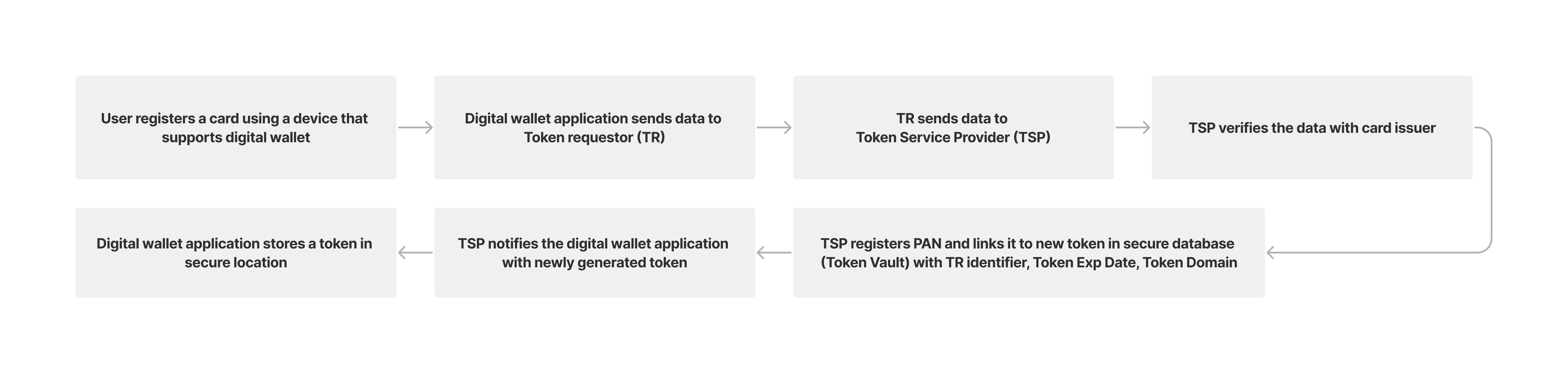
When a cardholder adds an eligible card to a digital wallet, the wallet provider, payment network, and issuer participate in the provisioning and verification process. Following successful provisioning, the wallet can use a payment token for supported transactions.
Step 1: Register a payment card in a digital wallet
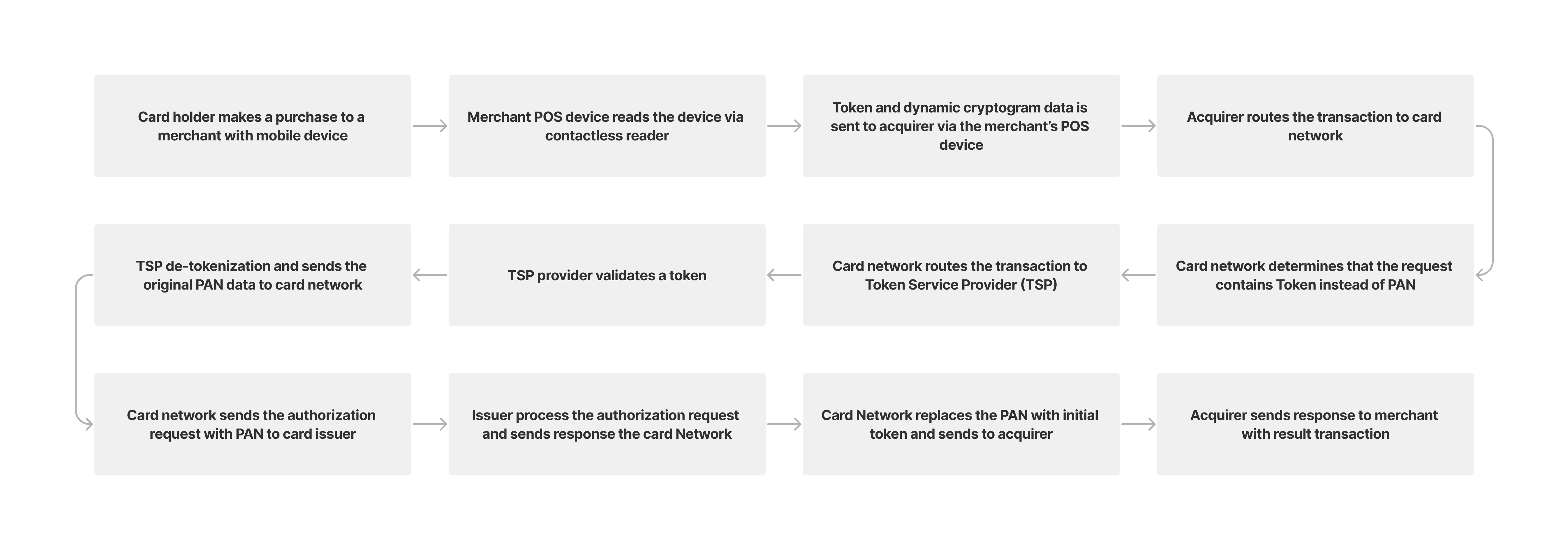
Step 2: Make a payment using a digital wallet
During a supported wallet payment, tokenized payment credentials are used in the transaction flow. The payment network can associate the token with the underlying card account as part of processing.
Supported digital wallets
Apple Pay
Apple Pay enables eligible cards to be added to Apple Wallet for use on supported Apple devices. Cardholders may add a card directly through Apple Wallet, or through an issuer application that supports push provisioning.
For implementation details, see Apple Pay – Push Provisioning.
Google Pay
Google Pay enables eligible cards to be provisioned to a supported Android wallet experience. Cardholders may add a card directly through the wallet or through an issuer application that supports push provisioning. The underlying credential storage and payment technology may vary by device and implementation.
For implementation details, see Google Pay – Push Provisioning.
Nium tokenization
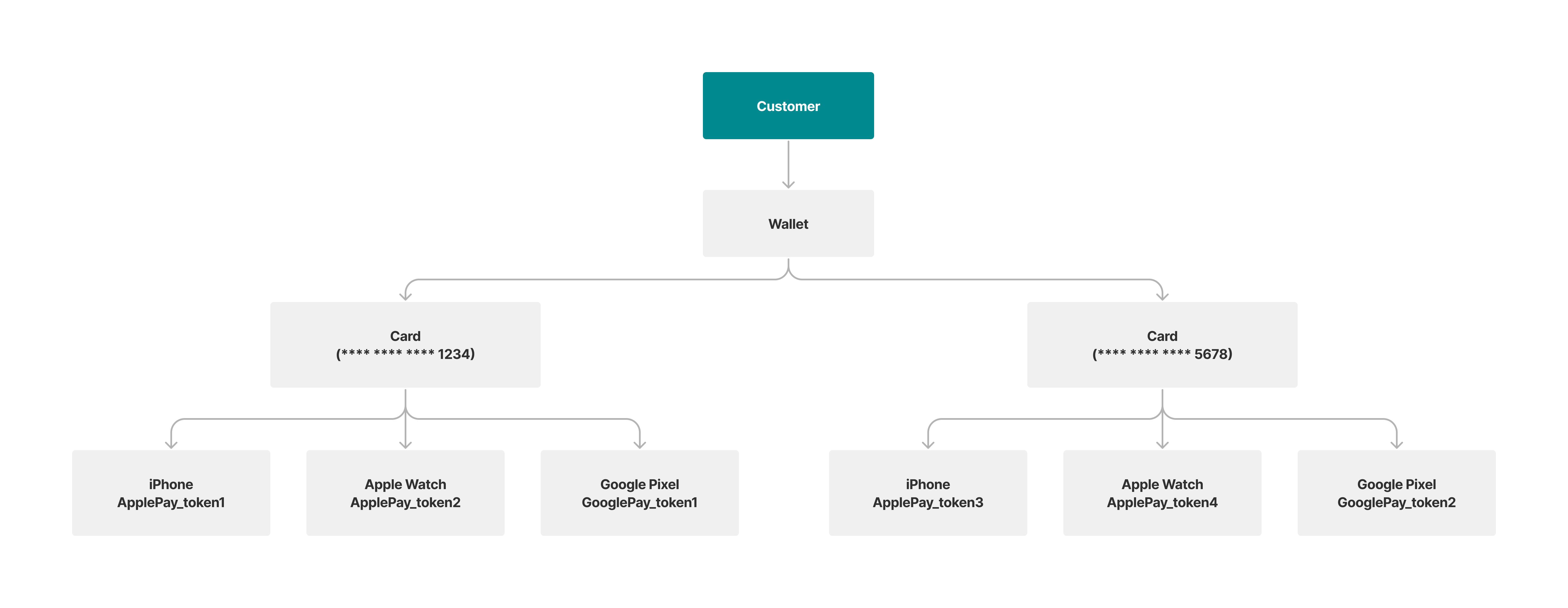
Nium supports card tokenization to help clients offer eligible cardholders a convenient way to add and use payment cards on supported mobile and wearable devices.
Provisioning methods
Nium describes two methods for adding a payment card to a digital wallet.
| Method | Cardholder experience | Client integration |
|---|---|---|
| Direct provisioning | The cardholder enters card details or scans an eligible card in the wallet application and completes any required verification. | A dedicated push provisioning SDK integration is not required for this card-entry journey. |
| Push provisioning | The cardholder starts the Add to Wallet flow from the client's mobile application, reducing the need to enter card details manually. | The client integrates the relevant Nium SDK into its iOS or Android application, including through native platform code in Flutter apps. |
Direct provisioning
With direct provisioning, the cardholder initiates card enrollment in the wallet application by entering card details or scanning a physical card, where supported. The wallet provider and issuer may require additional verification before the card is available for payments.
Push provisioning through your mobile app
With push provisioning, the client integrates Nium's iOS or Android SDK to initiate the Add to Wallet experience from within its mobile application. Nium's SDK supports the provisioning integration, while the client remains responsible for its application's user experience and the relevant platform configuration.
Use the Apple Pay integration guide or Google Pay integration guide to get started. Flutter developers can follow the corresponding Apple Pay Flutter SDK or Google Pay Flutter SDK guide.
Before you begin
Before implementing push provisioning, confirm the following with your Nium representative:
- Your card program and intended cards are eligible for the relevant digital wallet.
- The required SDK package, supported versions, and access arrangements are available.
- The wallet-provider entitlement, application approval, or certification requirements applicable to your integration have been identified.
- The SDK's approved authentication and credential-handling approach is documented for your application.
- You have an agreed test plan for supported devices, provisioning outcomes, and error handling.
Apple and Google may have their own application entitlement, approval, certification, and scheduling requirements. Coordinate the applicable requirements with your Nium representative and the relevant wallet provider before planning a production launch.