 Build faster with AI — Get started with the Nium MCP Server
3DS Security
Three-Domain Secure (3DS) is an authentication protocol designed to help protect online card payments by enabling cardholders to verify their identity during checkout. The card schemes offer 3DS through services such as Visa Secure and Mastercard Identity Check.
3DS authentication
3DS provides an additional security layer during online payments, typically before payment authorization. Depending on the transaction and configured authentication method, the cardholder may be asked to complete a challenge, such as entering a one-time password (OTP) or approving a request in a registered mobile application.
Successful 3DS authentication does not guarantee that the subsequent payment authorization will be approved.
3DS setup options supported by Nium
Nium supports the following authentication configurations, subject to the card program and issuing region:
| Authentication option | Description | Guide |
|---|---|---|
| OTP | The cardholder completes authentication using a one-time password. | One-Time Password |
| OTP plus knowledge-based authentication (KBA) | The cardholder completes OTP authentication and provides a six-digit knowledge-based passcode. | OTP and Knowledge |
| Out-of-band (OOB) authentication | The cardholder authenticates through a separate channel, such as a registered mobile application. | OOB Authentication |
| OOB with OTP fallback | OTP is used as a fallback when the OOB challenge cannot be completed, according to the configured flow. | OOB Authentication |
| OOB with OTP plus KBA fallback | OTP and KBA are used as a fallback when the OOB challenge cannot be completed, according to the configured flow. | OOB Authentication |
3DS setup options supported by Nium
Nium supports the following forms of 3DS authentication setups:
| Options | Description |
|---|---|
| OTP | The OTP mode of authentication is used to verify users before completing a transaction or running a session in an app or website. |
| OTP plus knowledge-based authentication (KBA) | The OTP plus KBA mode of authentication is a two-factor authentication that combines one-time passwords and KBA for enhanced online card transaction security. |
| Out-of-band (OOB) authentication | The OOB mode of authentication is used for secure online card transactions using alternative communication channels. For example, a push notification with Approve or Decline. |
| OOB with fallback (OTP) | The OOB with fallback OTP authentication mode is used with the provision of one-time passwords in the event of a response timeout for secure online card transactions. |
| OOB with fallback (OTP and KBA) | The OOB authentication with fallback OTP and KBA mode is used with the provision of one-time passwords and KBA in the event of a response timeout for secure online card transactions. |
OTP plus KBA and OOB with OTP plus KBA fallback are relevant to programs in the European Economic Area (EEA) and the United Kingdom (UK), where Strong Customer Authentication (SCA) requirements may apply. Confirm the appropriate configuration for your card program with Nium.
With OOB authentication, the cardholder uses a channel separate from the merchant checkout, such as a mobile application. Depending on the implementation, device possession and biometric or other verification may support multi-factor authentication.
OOB can be configured with a fallback mechanism for situations in which the cardholder cannot complete authentication through the mobile application, such as when push notifications cannot be received. The supported fallback depends on the configured authentication method and region.
Regional authentication options
The following table summarizes the regional options described in these guides:
| Region | Option 1 | Option 2 |
|---|---|---|
| Asia-Pacific (APAC) | OOB authentication with OTP fallback | OTP only |
| European Union and United Kingdom (EU/UK) | OOB authentication with OTP plus KBA fallback | OTP plus KBA |
You can configure Nium to determine the authentication method, or have Nium consult your system on every transaction. Where KBA applies, you can also choose whether Nium or your system validates the six-digit passcode.
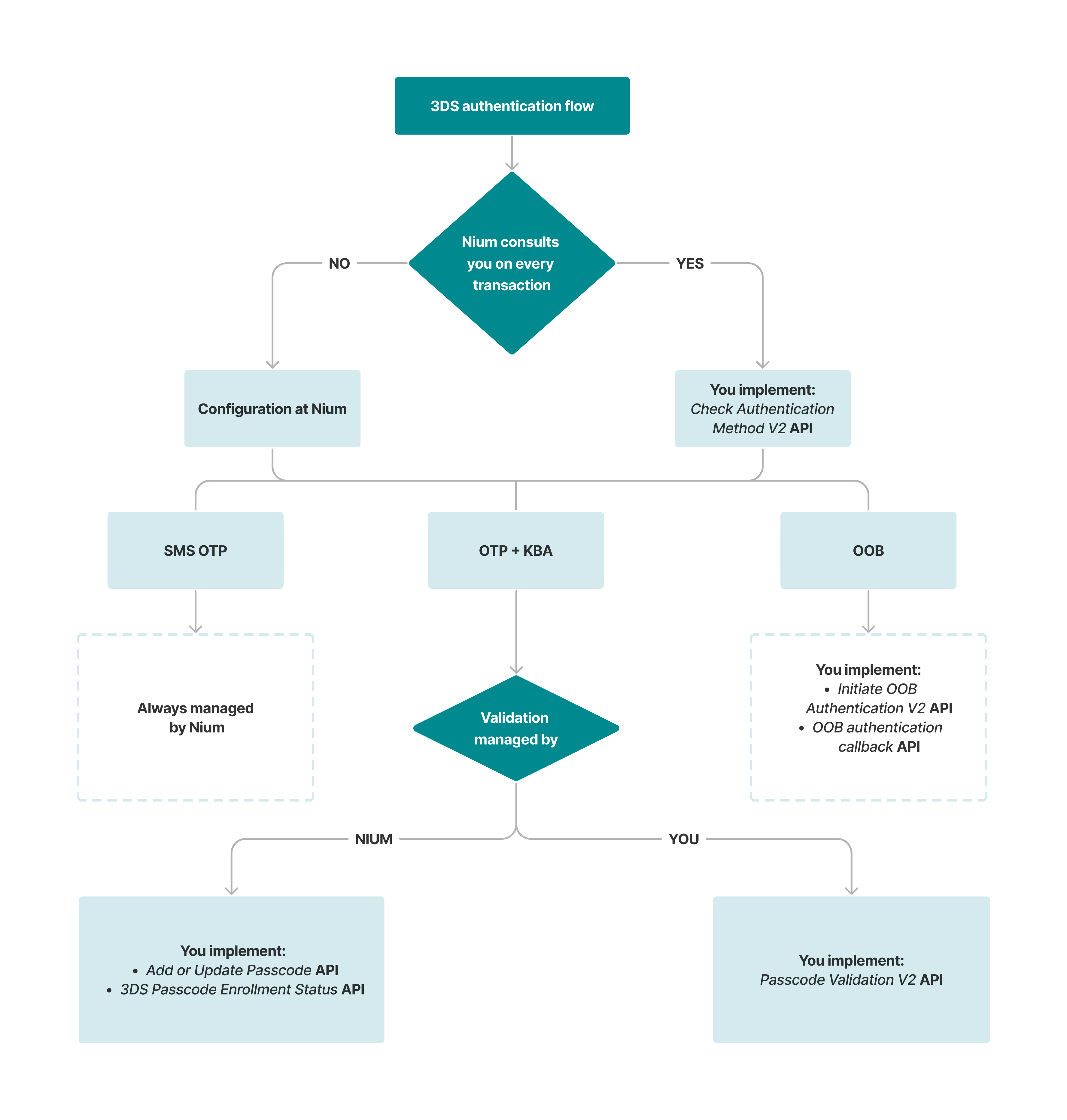
API integration requirements
The following table identifies the APIs relevant to each integration responsibility.
| Function | Managed by | API integration requirement | Relevant API |
|---|---|---|---|
| Authentication method selection | Nium | No client-hosted preference API required | — |
| Authentication method selection | You | Implement and host an endpoint for Nium to invoke | Check Authentication Method V2 |
| OTP authentication | Nium | No client-hosted OTP validation API required | One-Time Password guide |
| KBA validation | Nium | Integrate with Nium-hosted passcode enrollment and status APIs | Add or Update Passcode and 3DS Passcode Enrollment Status |
| KBA validation | You | Implement and host an endpoint for Nium to invoke | Passcode Validation V2 |
| OOB authentication | You | Implement and host the initiation endpoint; invoke Nium's callback endpoint to return the result | Initiate OOB Authentication V2 and OOB Authentication Callback |
Getting started with 3DS
Before implementing 3DS authentication, confirm your card program's configuration with Nium and identify the APIs required for your selected setup.
Step 1: Configure your 3DS authentication with Nium
Contact your Nium representative to agree on the 3DS configuration for your card program. Confirm:
- Authentication method: OTP, OTP plus KBA, OOB, or OOB with an available fallback option.
- Authentication method selection: Whether Nium determines the authentication method or consults your system on every transaction.
- KBA validation: Whether Nium or your system validates the six-digit passcode, if applicable.
- Regional requirements: Which options are available for your card program and issuing region.
Nium will confirm the applicable configuration and integration requirements.
Step 2: Prepare your integration and share your API URLs
Identify the endpoints your system must host for Nium to invoke, based on the agreed configuration:
| API | When required |
|---|---|
| Check Authentication Method V2 | When Nium consults your system to determine the authentication method. |
| Passcode Validation V2 | When your system validates the six-digit KBA passcode. |
| Initiate OOB Authentication V2 | When your system supports OOB authentication. |
Provide Nium with the relevant endpoint URLs for your integration. For OOB authentication, your system must also call the Nium-hosted OOB Authentication Callback to communicate the authentication outcome.
Confirm with Nium which API credentials, authentication requirements, and environment-specific settings apply to your setup before testing.
Check Authentication Method V2, Passcode Validation V2, and Initiate OOB Authentication V2 are client-hosted APIs invoked by Nium. The OOB Authentication Callback is hosted by Nium and invoked by your system. You do not provide Nium with a client-hosted callback URL for the Nium-hosted callback API.
Step 3: Implement the required APIs
Implement the integration required by your configuration:
- OTP only: Nium manages OTP generation and validation; no client-hosted OTP validation endpoint is required.
- OTP plus KBA: Implement Passcode Validation V2 if your system validates KBA. If Nium validates KBA, integrate with the applicable passcode enrollment and status APIs.
- OOB authentication: Implement Initiate OOB Authentication V2 to trigger authentication through your application and call the OOB Authentication Callback to return the outcome.
- Authentication method selection: Implement Check Authentication Method V2 if Nium is configured to consult your system on each transaction.
Refer to the individual API guides for request and response formats and validation requirements.
Step 4: Test your 3DS integration
Coordinate with Nium to test the agreed configuration in the applicable test environment before production enablement. Confirm how to initiate test 3DS transactions or events and which test credentials are required.
Test the scenarios relevant to your integration:
- Successful authentication: Complete the configured OTP, KBA, or OOB challenge successfully.
- Failed authentication: Verify the expected behavior for an incorrect passcode or declined OOB request.
- Timeout: Verify the expected outcome when the cardholder does not complete authentication within the permitted time.
- Fallback: If enabled, confirm that the configured fallback authentication method is triggered and completed as expected.
- API integration: Verify that client-hosted endpoints receive the expected requests and return responses matching the documented API contracts.
After testing, coordinate with Nium to confirm production readiness and enable the agreed configuration.
Implementation details
You must implement the relevant client-hosted APIs and provide Nium with their URLs when you choose to:
- Be consulted on every transaction to determine the authentication method.
- Manage the validation of the six-digit passcode for OTP plus KBA authentication.
- Support OOB authentication through your mobile application.
If Nium manages KBA validation, you may also need to integrate with Nium's passcode enrollment and status APIs.
The precise credential provisioning process, sandbox event-generation procedure, and production enablement requirements should be confirmed with Nium. These details are not specified in the source guides summarized here.