 Build faster with AI — Get started with the Nium MCP Server
OTP and Knowledge
The one-time password (OTP) and knowledge-based authentication (KBA) flow authenticates cardholders during online transactions by combining an OTP with a six-digit knowledge-based passcode.
This flow is designed to support Strong Customer Authentication (SCA) requirements under the European Union's revised Payment Services Directive (PSD2), where applicable. SCA generally uses at least two independent factors from the following categories:
- Possession: Something the cardholder has.
- Knowledge: Something the cardholder knows.
- Inherence: Something the cardholder is.
In this flow, an OTP delivered through an appropriately secured channel may support the possession factor, while the cardholder's six-digit passcode serves as the knowledge factor. Whether an implementation meets applicable SCA requirements depends on the controls and delivery methods used.
The SMS OTP plus KBA option described here is relevant to the European Economic Area (EEA) and the United Kingdom (UK). Confirm the applicable authentication configuration for your card program with Nium.
Six-digit knowledge factor
For card programs using OTP plus KBA, you must arrange for cardholders to create a six-digit passcode at an appropriate point in the customer lifecycle. Explain when the cardholder may need to use this passcode, such as during an online transaction requiring 3DS authentication.
The passcode can be managed by you or by Nium, depending on the program configuration.
Six-digit code KBA storage
| Stored By | Use case | Relevant API |
|---|---|---|
| You | You securely store the six-digit passcode and implement the Passcode Validation V2 API so that Nium can request validation during authentication. | Passcode Validation V2 |
| Nium | You collect the passcode from the cardholder and use Nium's APIs to enroll or update it. You can also retrieve its enrollment status. | •3DS Passcode Enrollment Status •Add Or Update Passcode |
One-leg out
Where the issuer or acquirer is outside the EEA or UK, one-leg-out (OLO) treatment may affect the applicable SCA requirements. Depending on the program configuration, Nium may use the standard OTP-based authentication flow. Confirm the applicable regulatory and scheme requirements for your program.
OTP plus KBA
The following diagrams illustrate the high-level interaction between the cardholder, merchant, card network, Nium and your system during a 3DS e-commerce authentication.
After successful authentication, the merchant-side participants receive the relevant authentication result, such as a Cardholder Authentication Verification Value (CAVV) or Universal Cardholder Authentication Field (UCAF), as applicable. This information is used in the subsequent authorization flow.
Configuration overview
The authentication flow depends on whether Nium consults your system to determine the authentication method and who validates the KBA passcode.
| Scenario | Consult you on every transaction | KBA validated by | Real-time APIs you implement |
|---|---|---|---|
| 1. Nium determines the authentication method and validates KBA | No | Nium | None |
| 2. You determine the authentication method; Nium validates KBA | Yes | Nium | Check Authentication Method V2 |
| 3. Nium determines the authentication method; you validate KBA | No | You | Passcode Validation V2 |
| 4. You determine the authentication method and validate KBA | Yes | You | Check Authentication Method V2 and Passcode Validation V2 |
The table lists real-time authentication APIs. If Nium stores the passcode, integration with the passcode enrollment and status APIs may still be required.
Scenario 1: Nium determines the authentication method and validates KBA
Nium manages the 3DS authentication flow and validates the six-digit passcode. Nium does not consult your system to select the authentication method for each transaction.
- Consult you on every transaction: No
- KBA validated by: Nium
You do not need to implement a real-time authentication API for this scenario. Passcode enrollment may still require integration with Nium's APIs.
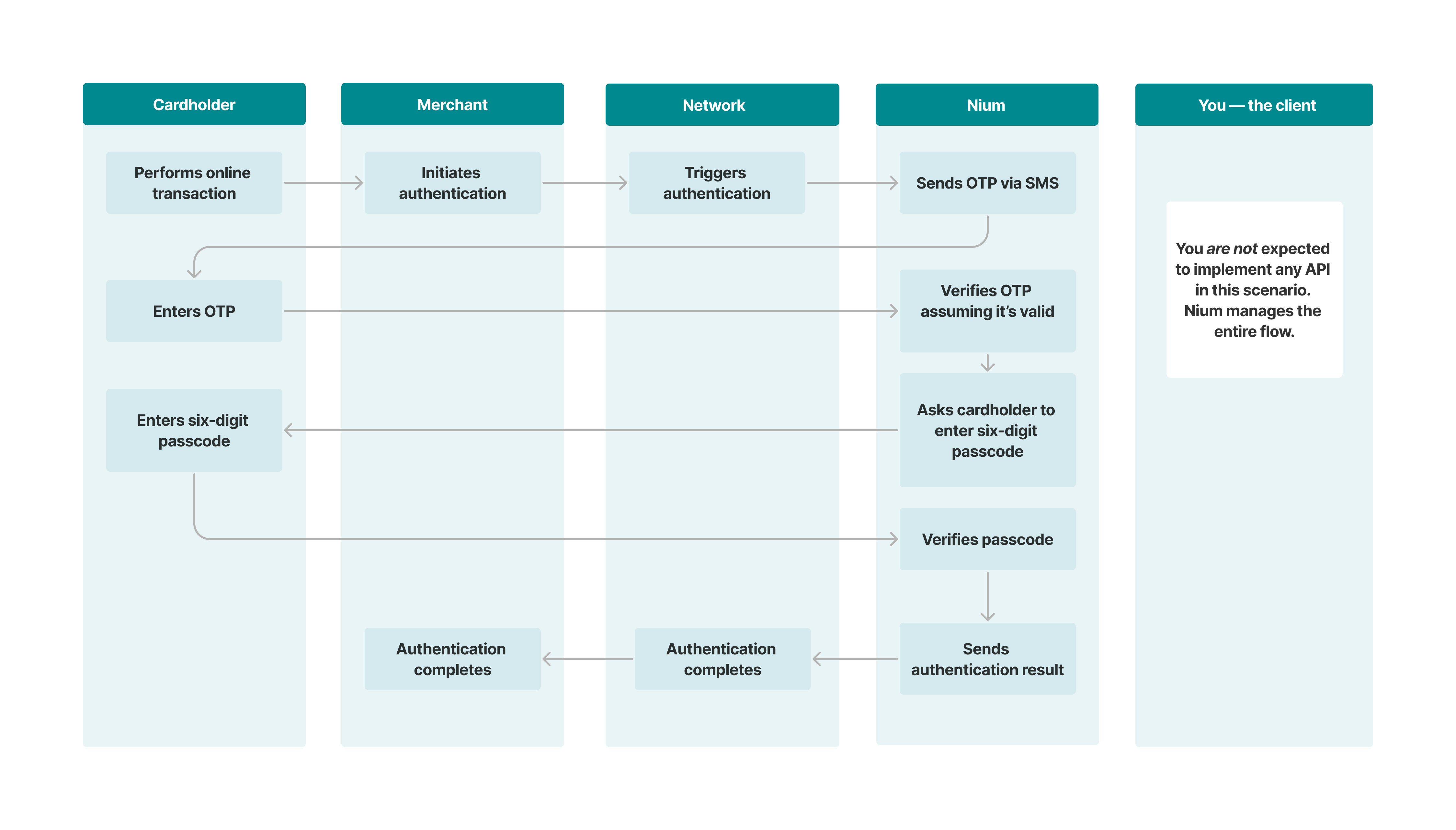
Transaction flow
- The cardholder initiates an online transaction at an e-commerce merchant.
- The merchant initiates a 3DS authentication request through the applicable card network.
- The card network routes the authentication request to Nium.
- Nium prompts the cardholder through the merchant's checkout experience to enter an OTP sent through the configured delivery channel(s).
- Nium verifies the OTP and determines that an additional KBA challenge is required.
- Nium prompts the cardholder to enter the six-digit passcode.
- The cardholder enters the passcode.
- Nium validates the passcode and returns the authentication result through the 3DS flow.
Scenario 2: You determine the authentication method, Nium validates KBA
Nium consults your system on each applicable transaction through the Check Authentication Method V2 API. Nium manages the 3DS challenge and validates the six-digit passcode.
- Consult you on every transaction: Yes
- KBA validated by: Nium
Implement the Check Authentication Method V2 API for this scenario. If Nium stores the passcode, the enrollment APIs may also be needed.
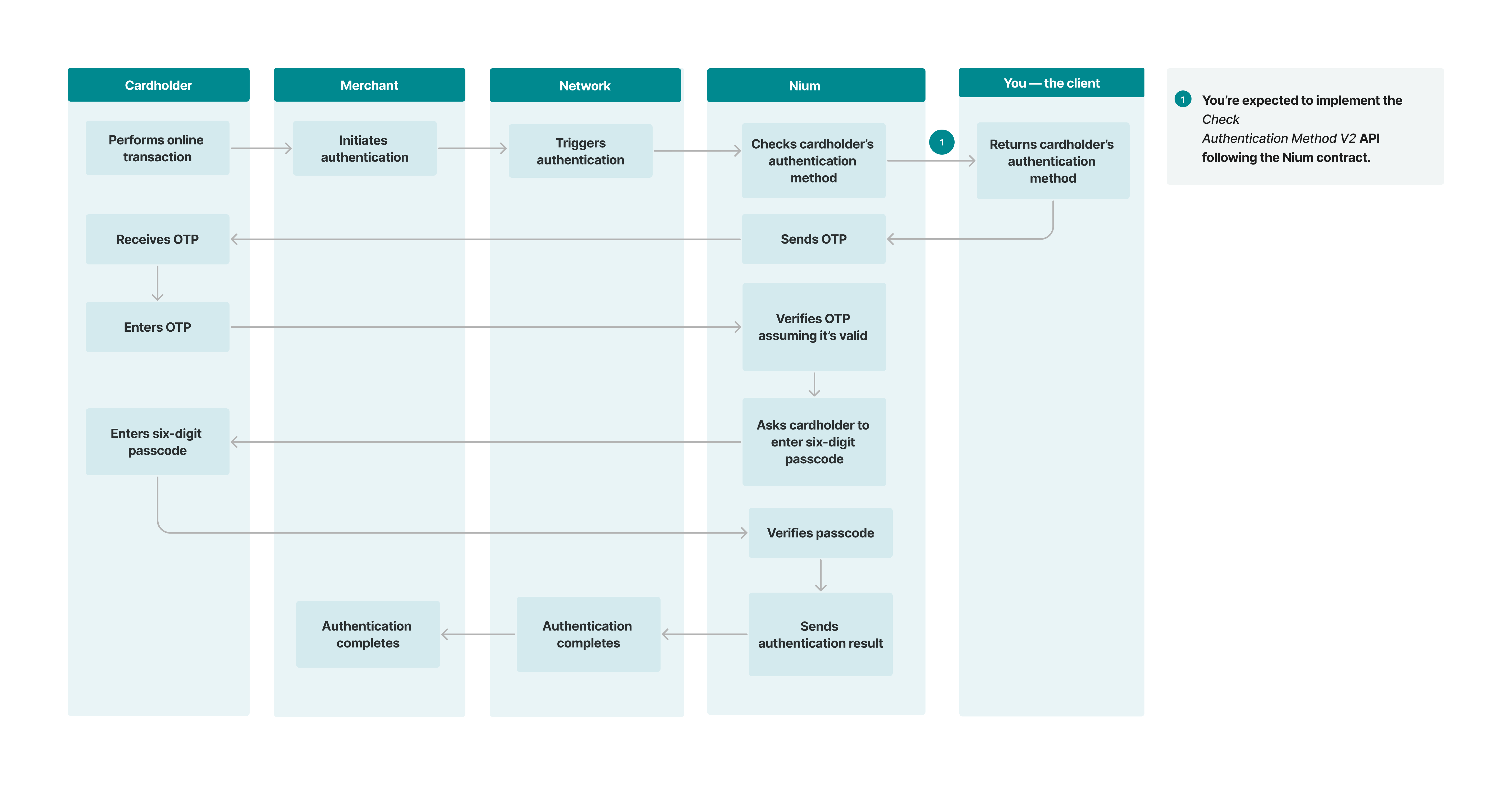
Transaction flow
- The cardholder initiates an online transaction at an e-commerce merchant.
- The merchant initiates a 3DS authentication request through the applicable card network.
- The card network routes the authentication request to Nium.
- Nium invokes your Check Authentication Method V2 API to determine the applicable authentication method.
- Nium prompts the cardholder through the merchant's checkout experience to enter an OTP sent through the configured delivery channel(s).
- Nium verifies the OTP and determines that an additional KBA challenge is required.
- Nium prompts the cardholder to enter the six-digit passcode.
- The cardholder enters the passcode.
- Nium validates the passcode and returns the authentication result through the 3DS flow.
Scenario 3: Nium determines the authentication method; you validate KBA
Nium manages the 3DS authentication flow without consulting your system to select the authentication method for each transaction. Your system validates the six-digit passcode through the Passcode Validation V2 API.
- Consult you on every transaction: No
- KBA validated by: You

Transaction flow
The cardholder initiates an online transaction at an e-commerce merchant. 2. The merchant initiates a 3DS authentication request through the applicable card network. 3. The card network routes the authentication request to Nium. 4. Nium prompts the cardholder through the merchant's checkout experience to enter an OTP sent through the configured delivery channel(s). 5. Nium verifies the OTP and determines that an additional KBA challenge is required. 6. Nium prompts the cardholder to enter the six-digit passcode. 7. The cardholder enters the passcode. 8. Nium invokes your Passcode Validation V2 API to validate the six-digit passcode. 9. Your system validates the passcode and returns the result to Nium. 10. Nium processes the validation result and returns the authentication outcome through the 3DS flow.
Scenario 4: You determine the authentication method and validate KBA
Nium consults your system on each applicable transaction through the Check Authentication Method V2 API. Your system also validates the six-digit passcode through the Passcode Validation V2 API.
- Consult you on every transaction: Yes
- KBA validated by: You
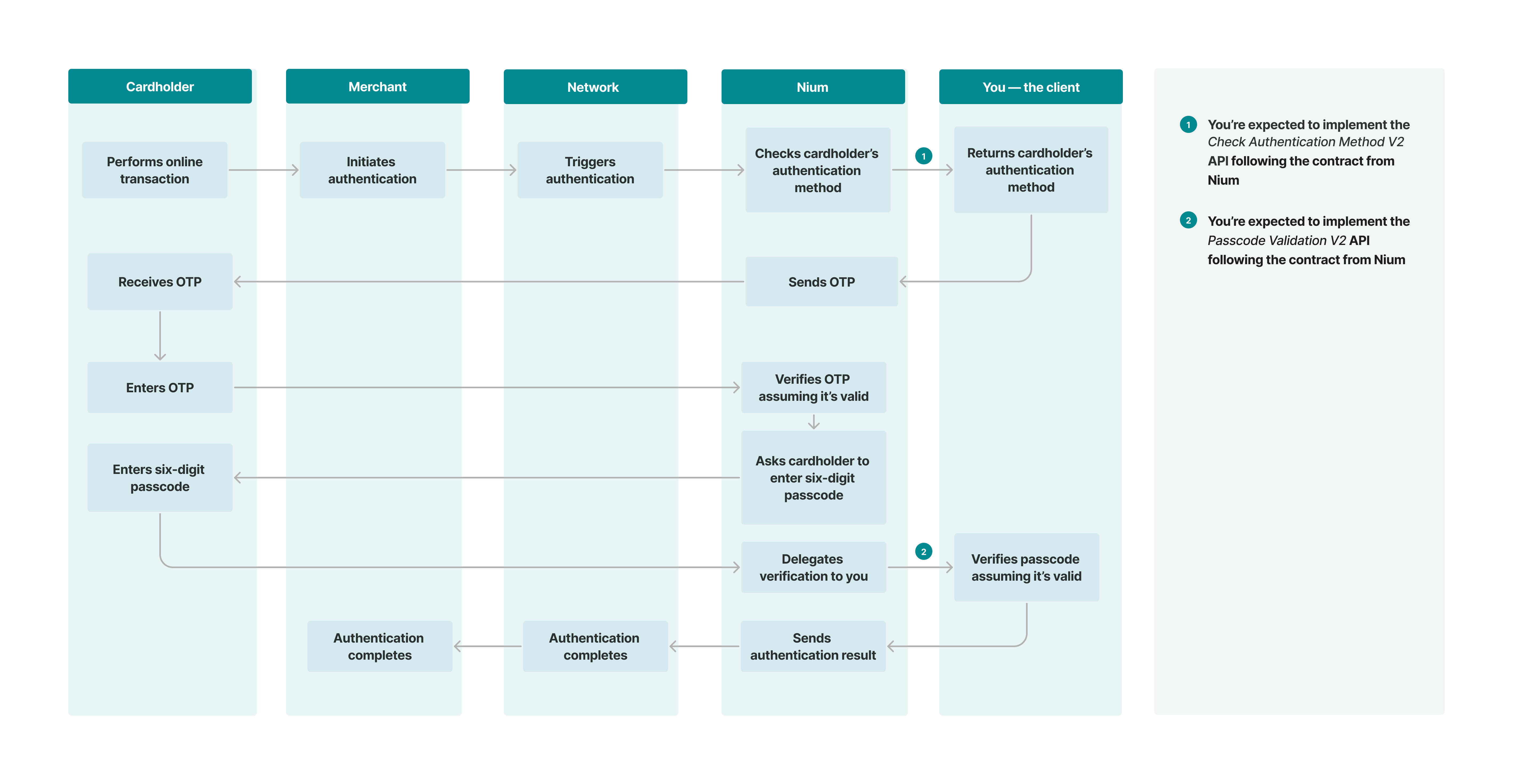
Transaction flow
When a cardholder attempts to make an online payment to a merchant supporting 3DS authentication, the following process occurs:
- The cardholder initiates an online transaction at an e-commerce merchant.
- The merchant initiates a 3DS authentication request through the applicable card network.
- The card network routes the authentication request to Nium.
- Nium invokes your Check Authentication Method V2 API to determine the applicable authentication method.
- Nium prompts the cardholder through the merchant's checkout experience to enter an OTP sent through the configured delivery channel(s).
- Nium verifies the OTP and determines that an additional KBA challenge is required.
- Nium prompts the cardholder to enter the six-digit passcode.
- The cardholder enters the passcode.
- Nium invokes your Passcode Validation V2 API to validate the six-digit passcode.
- Your system validates the passcode and returns the result to Nium.
- Nium processes the validation result and returns the authentication outcome through the 3DS flow.