 Build faster with AI — Get started with the Nium MCP Server
US Onboarding
This page outlines the US Know Your Business (KYB) flows and links to reference pages:
| Page name | Description |
|---|---|
| US required parameters | Lists the required request fields for each entity type used in eKYB. |
| US required documents | Tables of required documents for the business entity, stakeholders, and applicants. |
| US position mapping | Required positions for each entity type at a glance. |
| US request examples | Example requests for US entities. |
Nium supports both eKYB and Manual KYB for customers in the United States.
- eKYB is fully automated and can approve eligible customers within minutes of submission.
Contact your Nium Sales representative to enable eKYB for your account.
eKYB flow
Follow these steps to complete an eKYB application in the US.
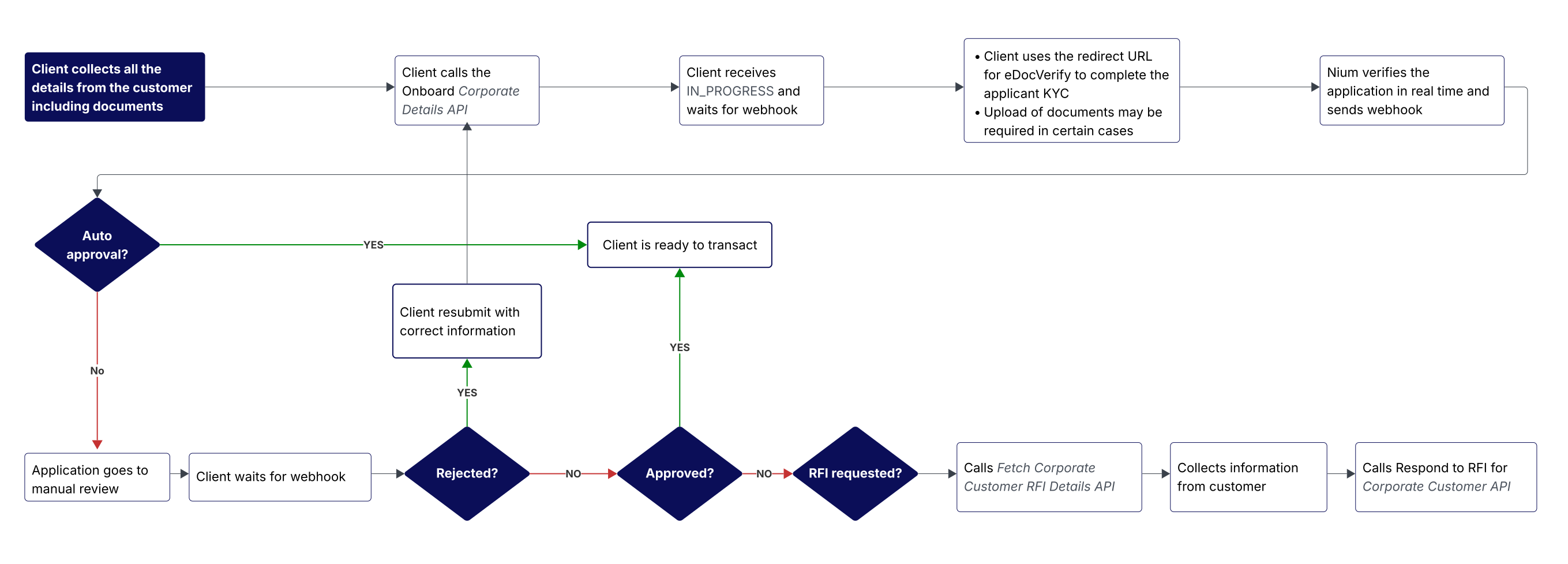
Onboard corporate customers
Collect the required data in your onboarding form and call Onboard Corporate Customer with the full request body.
Applicant KYC
Supported applicant KYC modes for eKYB in the US:
E_KYC(recommended for US residents)E_DOC_VERIFY(recommended for non-US residents)MANUAL_KYC(available if needed for non-US residents; goes to manual review and is not real-time)
Set the mode in businessDetails.applicantDetails.kycMode.
- Documents are required for
MANUAL_KYCand must be sent inbusinessDetails.applicantDetails.documentDetails.
See US required documents.
Applicant eDocVerify
When you use the Onboard Corporate Customer request, Nium returns a redirect URL.
Your app must store this URL and redirect the applicant to the KYC vendor’s page to complete identity checks (POI/POA + liveness). After completion, the applicant is redirected back to your configured client KYC redirect URL.
Redirection outcomes are indicated by the following query parameters:
errorCodeerrorMessageisSuccess— Indicates whether the applicant completed the steps in the vendor UI (not the final KYC result).
| Scenario | Expected client action | Redirect query parameters |
|---|---|---|
| Applicant completed the required steps in the vendor UI. | Wait for the webhook. | isSuccess=true, errorCode=N/A, errorMessage=N/A |
| Document already submitted at the vendor. | KYC processing will continue. Wait for the webhook. | isSuccess=false, errorCode=R403, errorMessage=documentAlreadySubmitted |
| Customer provided incorrect data at the vendor. | Ask the customer to correct the data on the vendor page. | isSuccess=false, errorCode=I400, errorMessage=vendorValidationError |
| Vendor verification failed. | Application goes to manual review. Wait for the webhook. | isSuccess=false, errorCode=R401, errorMessage=vendorVerificationFailure |
| Internal server error at Nium. | Retry later or contact Nium Support. | isSuccess=false, errorCode=R500, errorMessage=internalServerError |
| Unexpected vendor error. | Retry later or contact Nium Support. | isSuccess=false, errorCode=I500, errorMessage=unexpectedError |
| Validation already completed and link reused. | KYC is completed. Wait for the webhook. | isSuccess=false, errorCode=R606, errorMessage=verificationAlreadyCompleted |
Examples
-
Successful redirect:
https://www.clientRedirectURL.com/?clientId=...&caseId=4ff53849-3d30-45c8-af11-f95c315ce83c&isSuccess=true&errorCode=&errorMessage= -
Failed redirect (expired):
https://www.clientRedirectURL.com/?clientId=...&caseId=4ff53849-3d30-45c8-af11-
Address formatting rules
- If
businessDetails.applicantDetails.address.country = US,statemust be a valid 2-letter state code. - Use Fetch corporate constants.
- If
country = GB,postcodemust be inSW4 6EHformat.
Stakeholder KYC
Supported KYC modes for individual stakeholders in the US eKYB flow:
E_KYC(US residents)MANUAL_KYC(non-US residents; manual review required)
Set the mode in businessDetails.stakeholders.stakeholderDetails.kycMode.
- Documents are required for
MANUAL_KYCand must be sent inbusinessDetails.stakeholders.stakeholderDetails.documentDetails.
See US required documents.
Upload documents
Documents may be required if any applicant or stakeholder uses MANUAL_KYC.
How to submit documents
- With Upload Document (preferred: one document per call for faster UX).
- With Onboard Corporate Customer request (bulk upload in the same request).
- Use the
remarksfield (in responses) to see which documents Nium expects.
The API gateway limits request payloads to 10 MB.
Prefer Upload Document to send files one at a time.
For a complete list of required documents for eKYB and Manual KYB, see US required documents.
Applicant declaration
US applicants must accept the following declaration:
I certify that I am the authorized representative of the customer; all information provided and documents submitted are complete and correct. I confirm that I have provided all the UBOs present. I have read and accepted the Nium Terms and Conditions.
Implementation notes:
- Capture acceptance via clickwrap.
- Send confirmation by passing
YesinbusinessDetails.applicantDetails.additionalInfo.applicantDeclarationand include a timestamp. - This field is mandatory. Any value other than
Yesresults in a validation error. - Display the declaration text where you collect consent.
Terms and conditions
- Customers must be shown the Nium Terms and Conditions configured for your
clientresource. - Fetch them with Terms and Conditions API.
Do not allow submission until the customer accepts the terms.
Integration flow
- Call Onboard Corporate Customer and obtain a
customerHashId. - Call Accept Terms and Conditions with
customerHashId. - Display the returned T&Cs and record acceptance before enabling transactions.
For more details, see Terms and Conditions.
Webhook response
After submission and applicant KYC completion, the Onboard Corporate Customer response shows status = IN_PROGRESS.
Nium performs real-time verification and sends results via webhook. The application may be approved at this stage; otherwise, it proceeds to manual review. Any further status changes are also sent via webhook.
- For next steps, follow the guidance in the relevant webhook response.
Manual KYB flow
Manual KYB follows the eKYB sequence, with one key difference: documents are always required.
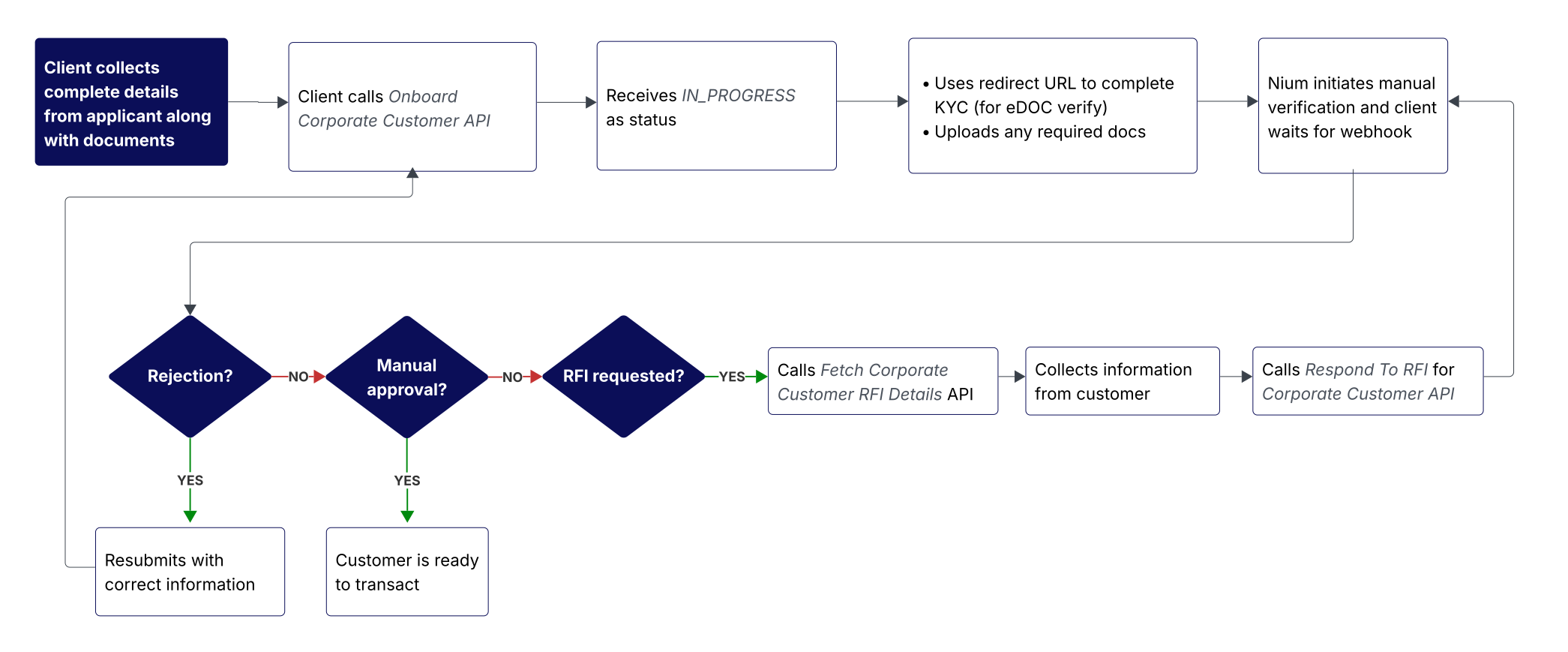
Submitting documents
-
You may include documents in Onboard Corporate Customer, but using Upload Document is preferred (one file per call, faster UX).
-
Use the
remarksfield in either API’s response to see which documents Nium expects.
Processing
- After documents are uploaded, Nium initiates verification.
- You’ll be notified of all
statuschanges via webhook. - For the full list of required documents (eKYB and Manual KYB), see US required documents.
Constraints
- Upload Document can be called only while the application is in
IN_PROGRESS.
Implementation checklist
- Business documents are mandatory for
MANUAL_KYB. Send them using the Onboard Corporate Customer request or the preferred Upload Document request underbusinessDetails.documentDetails.
Nium will not start verification until all required documents are submitted. - Applicant KYC is the same as eKYB. See Applicant KYC.
- Stakeholder KYC in Manual KYB supports only
MANUAL_KYCfor individual stakeholders.- Set
businessDetails.stakeholders.stakeholderDetails.kycMode = MANUAL_KYC. - Upload documents in
businessDetails.stakeholders.stakeholderDetails.documentDetails. - See US required documents.
- Set
- Applicant declaration is required (same as eKYB).
- Terms and Conditions flow is the same as in eKYB.
After submission and document upload, Nium performs a manual review.
- For next steps, refer to the webhook event.
- See Notifications and Webhooks.