 Build faster with AI — Get started with the Nium MCP Server
Locked Rate for Payouts
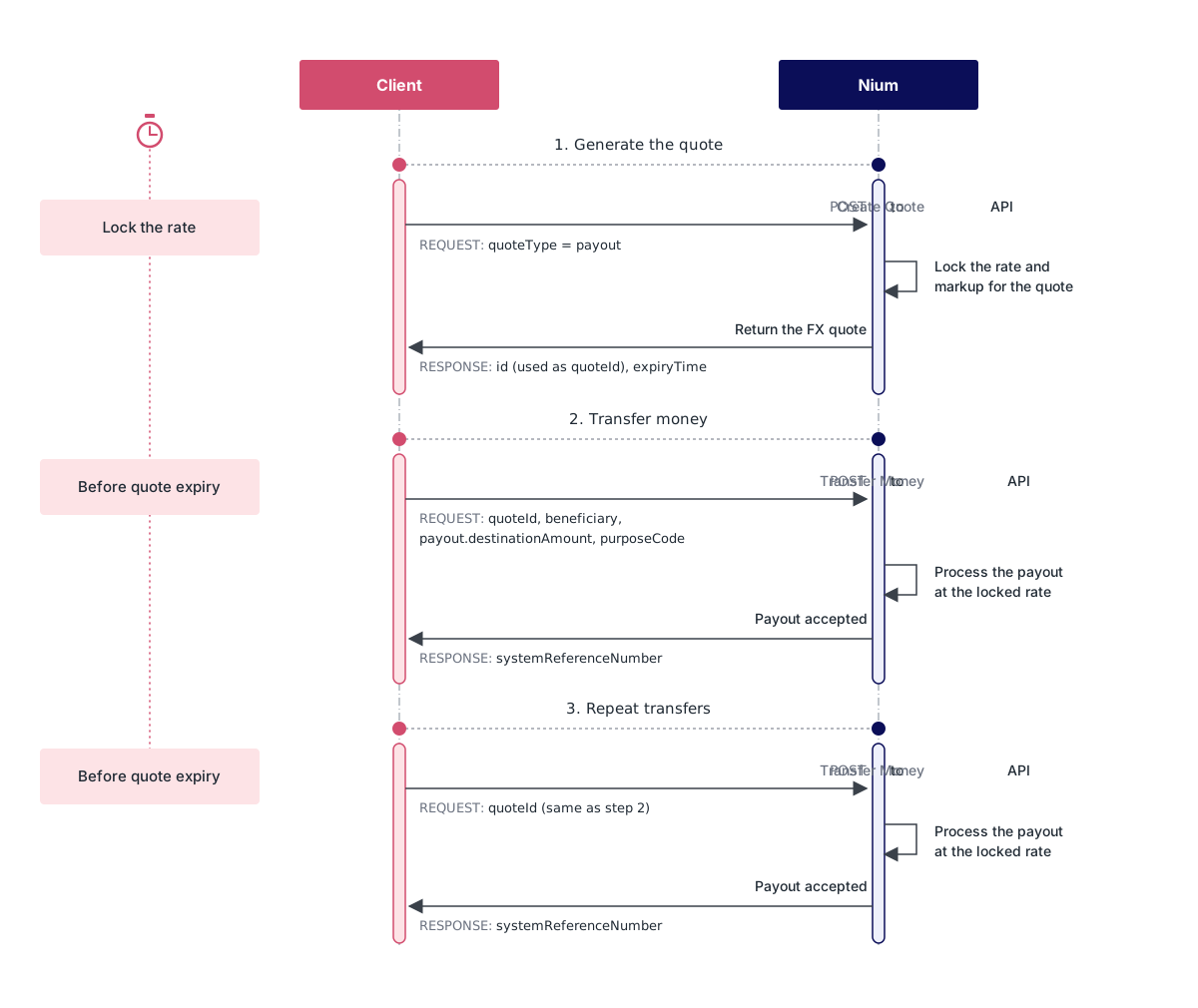
If you want to lock an FX rate once and use it for several payouts within the quote's validity period, create a payout quote and pass its id as the quoteId in each Transfer Money request. Every payout that uses the quote is sent at the locked rate, even if the market rate moves.
Step 1: Get a payout quote
Create an FX quote with quoteType as payout, the source and destination currencies, a conversionSchedule of immediate, and an executionType of at_conversion_time. The sourceCurrencyCode, destinationCurrencyCode and quoteType fields are required. Set the lockPeriod to the period for which you want to hold the rate.
curl -X POST "https://gateway.nium.com/api/v1/client/{clientHashId}/quotes" \
    -H "accept: application/json" \
    -H "Content-Type: application/json" \
    -d
'{
    "sourceCurrencyCode": "USD",
    "destinationCurrencyCode": "SGD",
    "quoteType": "payout",
    "conversionSchedule": "immediate",
    "executionType": "at_conversion_time",
    "lockPeriod": "1_hour"
}'
Supported lockPeriod values are 5_mins, 15_mins, 1_hour (default), 4_hours, 8_hours, and 24_hours. A longer lock period carries a higher Nium markup.
The response includes the quote id, the locked exchange rate, and the expiryTime. Keep the id to use as the quoteId in your payouts.
Step 2: Create the payout with the quote
Send the quote id as quoteId (or quote_id) inside the payout object of the Transfer Money request. The request also requires the beneficiary, the payout object, the purposeCode and the sourceOfFunds. Include either payout.destinationAmount or payout.sourceAmount.
curl -X POST "https://gateway.nium.com/api/v1/client/{clientHashId}/customer/{customerHashId}/wallet/{walletHashId}/remittance" \
    -H "accept: application/json" \
    -H "Content-Type: application/json" \
    -d
'{
    "beneficiary": {
        "id": "6081219f04fa070017d12e68"
    },
    "payout": {
        "quoteId": "quote_4VmJfRsR2ZMKbJKf4Po1CX",
        "destinationAmount": 10
    },
    "purposeCode": "IR005",
    "sourceOfFunds": "Corporate Account"
}'
The response includes a systemReferenceNumber that you can use to track the payout. For details of the Transfer Money request, see Transfer Money.
Step 3: Repeat payouts with the same quote
Pass the same quoteId in each further Transfer Money request, with the exact amount for that payout. You can make as many payouts as you need until the quote reaches its expiryTime. Each payout uses the locked rate.
Step 4: Handle an expired quote
If you send a Transfer Money request with a quoteId after its expiryTime, the request fails with an error. Create a new payout quote and retry the payout with the new id.
A quote is used by reference only. You don't need to convert or hold funds in the destination currency in advance.