 Build faster with AI — Get started with the Nium MCP Server
Forwards
FX Forwards allow eligible business customers to secure an exchange rate today for a future currency conversion, between 7 and 30 calendar days ahead, to facilitate an identifiable payment for goods, services or direct investment. FX Forwards must be used for genuine commercial payment purposes and not for speculative trading or standalone hedging.
When booking an FX Forward, you must provide the required collateral to secure your obligations against adverse exchange rate movements. Additional collateral may be required before settlement, and you must ensure sufficient funds are available to complete the conversion on the agreed settlement date. FX Forward Transactions are subject to Nium's acceptance and the applicable FX Forward Service Terms.
Forwards are available only to clients onboarded in the EU region and must be enabled for your account. Contact your Nium Account Manager to enable forwards.
A forward can be used only to pay for identifiable goods, services, or direct investment. It cannot be used for standalone hedging, speculation, or trading. You must state the payment purpose when you book a forward.
How forwards differ from other FX conversions
| Market Rate | Locked Rate | Scheduled Rate | Forwards | |
|---|---|---|---|---|
| Rate | Live market rate | Locked for a lockPeriod | Locked for a lockPeriod | Locked for 10 minutes to book, then fixed until the value date |
| When it settles | Immediately | Immediately, or at conversionTime | End of day, next day, or 2 days | On the valueDate you choose (7 to 30 calendar days ahead) |
| Collateral | Not required | Not required | Not required | Required, in USD, GBP, or EUR |
| Request field | conversionSchedule | conversionSchedule | conversionSchedule | tradeType set to FORWARDS, with valueDate |
Key terms
- Value date: The date you choose for the forward to mature. You set it when you get the quote, in
YYYY-MM-DDformat, using UTC. - Settlement date: The date the conversion actually settles. It is the same as the value date unless the value date falls on a weekend or a holiday for either currency. In that case, the settlement date moves forward to the next valid business day. The value date itself does not change.
- Underlying payment: The identifiable payment for goods, services, or direct investment that the forward is used for. When you book a forward, you provide the payment purpose. Nium does not collect other underlying payment details, such as invoices, contracts, beneficiaries, or due dates. Payments made from the settled funds are subject to Nium's compliance checks and requests for information.
- Collateral: The amount you post when you book the forward, held in a collateral wallet until settlement. It is calculated as a percentage of the source amount, converted into the collateral currency. On adverse market conditions, Nium may require additional collateral before settlement, by providing you the additional amount and the deadline. When the forward settles successfully, the full collateral is returned to your main wallet, provided no deductions apply.
- Funding obligation: You must hold the full
sourceAmountin the source wallet on the settlement date. Collateral does not replace this. Losses and close-out costs can be higher than the collateral you have posted. - Binding booking: A forward is binding once Nium confirms the conversion. Nium may decline any request. A forward cannot be rolled over, extended, assigned, or partially drawn down.
- Mark-to-market (MTM): The difference between the locked forward rate and the market rate at the time it is calculated. MTM is charged in only two cases: when you cancel a forward, and when a forward does not settle because the source wallet has insufficient funds. In both cases, if there is an MTM loss at the time of cancellation / settlement, the loss is charged to your collateral currency main wallet.
- Non-settlement fee: If the sell-currency wallet does not hold enough funds on the settlement date, the forward does not settle. Nium returns your collateral to your collateral currency main wallet, after deducting the non-settlement fee, any MTM loss, and any other outstanding costs. These deductions can exceed the collateral held. See Insufficient funds on the settlement date.
Before you begin
- Your account must be enabled for forwards.
- Each forward must be used for an identifiable payment for goods, services, or direct investment. You must state the payment purpose when you book the forward.
- Forwards are provided by Nium Fintech Limited, which could be different from the Nium entity that provides your wallet and payment services. Your use of forwards is governed by the FX Forward Service Terms.
- Create a main wallet and a collateral wallet for the collateral currency you want to use (
USD,GBP, orEUR). - Make sure the sell-currency wallet holds the
sourceAmounton the settlement date. If it doesn't, the forward does not settle. See Insufficient funds on the settlement date. - Quotes, conversions, cancellation quotes, and cancellation confirmations can be requested only during market hours: Monday to Friday, 08:00 to 23:00 Israel time.
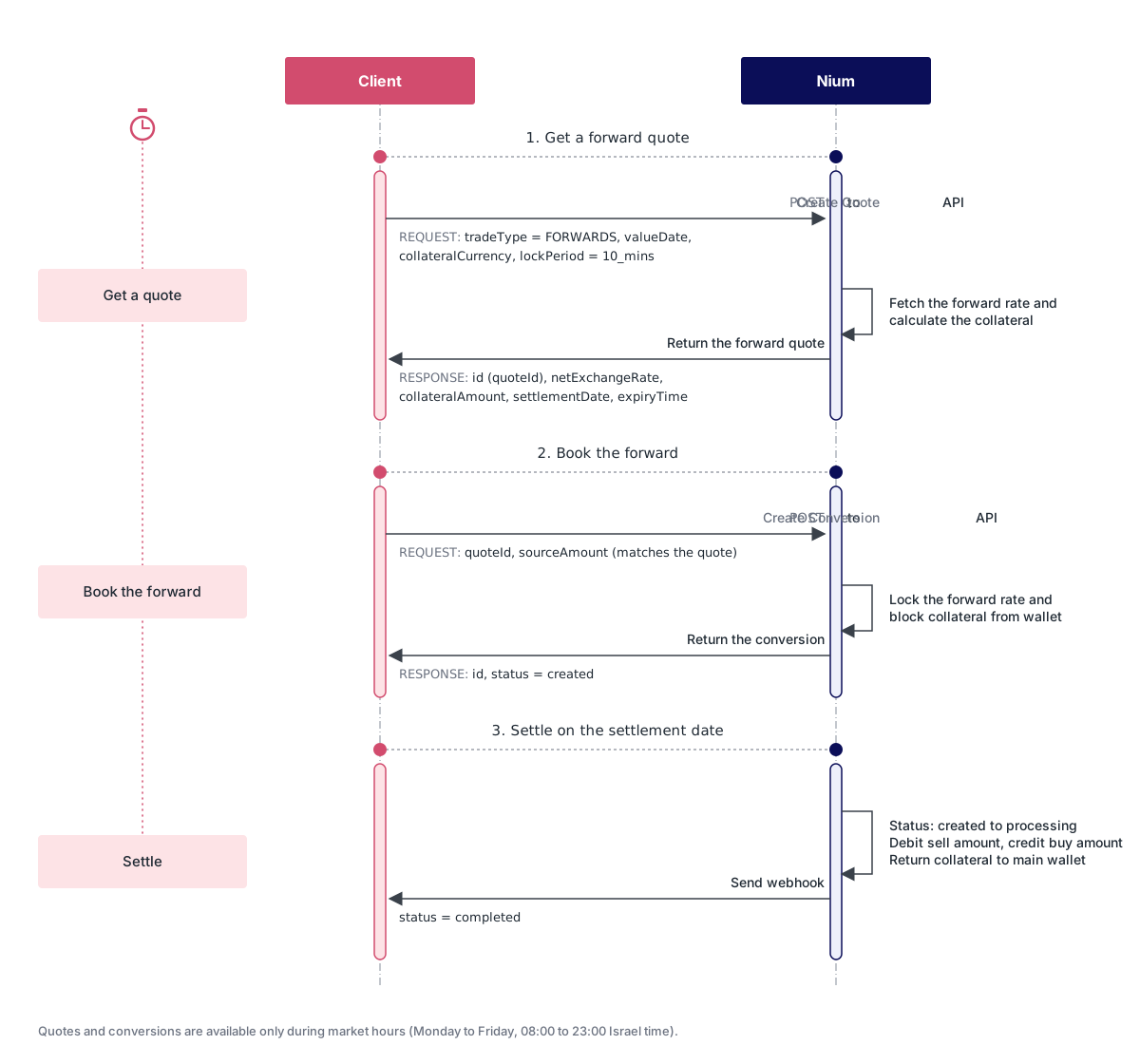
Step 1: Get a forward quote
Get a quote with tradeType set to FORWARDS, a valueDate between 7 and 30 calendar days from today, and the collateralCurrency you want to post. Set lockPeriod to 10_mins and executionType to at_conversion_time. Do not send conversionSchedule with a forward quote, send valueDate instead. The forward must be used for an identifiable payment for goods, services, or direct investment.
curl -X POST "https://gateway.nium.com/api/v1/client/{clientHashId}/quotes" \
    -H "accept: application/json" \
    -H "Content-Type: application/json" \
    -d
'{
    "tradeType": "FORWARDS",
    "sourceCurrencyCode": "EUR",
    "destinationCurrencyCode": "USD",
    "sourceAmount": 10000,
    "valueDate": "2026-11-10",
    "collateralCurrency": "USD",
    "executionType": "at_conversion_time",
    "lockPeriod": "10_mins",
    "quoteType": "balance_transfer"
}'
The response includes the locked forward rate, the collateral you need to post, and the proposed settlement date.
{
    "id": "quote_7KpQ3vLxRt2WfYbN8ZcD1M",
    "tradeType": "FORWARDS",
    "netExchangeRate": 1.072440000,
    "exchangeRate": 1.081620000,
    "markupRate": 0.009180000,
    "clientMarkupRate": 0.009180000,
    "sourceCurrencyCode": "EUR",
    "destinationCurrencyCode": "USD",
    "quoteType": "balance_transfer",
    "executionType": "at_conversion_time",
    "lockPeriod": "10_mins",
    "conversionSchedule": null,
    "valueDate": "2026-11-10",
    "settlementDate": "2026-11-10",
    "sourceAmount": 10000,
    "destinationAmount": 10724.40,
    "destinationMarkupAmount": 91.80,
    "collateralAmount": 540,
    "collateralCurrency": "USD",
    "rateCaptureTime": "2026-10-26 08:00:00",
    "createdTime": "2026-10-26 08:00:00",
    "expiryTime": "2026-10-26 08:10:00"
}
Key response fields:
| Field | Description |
|---|---|
netExchangeRate | The forward rate you get, after the Nium markup. Use this rate to calculate the destination amount. |
exchangeRate | The interbank forward rate before the Nium markup. |
markupRate | The total markup, exchangeRate minus netExchangeRate. |
destinationMarkupAmount | The markup amount in the destination currency. |
valueDate | The value date you requested. |
settlementDate | The date the conversion will settle. |
collateralAmount | The collateral amount required for the forward conversion in collateralCurrency. |
expiryTime | The time the quote expires. This is 10 minutes after createdTime. |
If you provide destinationAmount instead of sourceAmount, Nium calculates the source amount using the same forward rate, and the collateral is calculated from that source amount.
A valueDate that is earlier than 7 calendar days, later than 30 calendar days, or in the past is rejected. A forward quote without a valueDate is also rejected.
Step 2: Accept the quote and create the conversion
Create the conversion before expiryTime, and during market hours (Monday to Friday, 08:00 to 23:00 Israel time). Requests outside these hours are rejected. Send the quoteId from the quote and the same sourceAmount or destinationAmount you received in the quote. The amounts must match the quote exactly. A quote can be used for only one conversion.
curl -X POST "https://gateway.nium.com/api/v1/client/{clientHashId}/customer/{customerHashId}/wallet/{walletHashId}/conversions" \
-H "accept: application/json" \
-H "Content-Type: application/json" \
-d
'{
    "quoteId": "quote_7KpQ3vLxRt2WfYbN8ZcD1M",
    "sourceAmount": 10000,
    "customerComment": "Payment for consulting services to supplier"
}'
When you accept the quote, Nium moves the collateral from the collateral currency main wallet into the collateral wallet. The forward is binding once Nium confirms the conversion. If the forward cannot be confirmed, for example because the quote expired at the same moment, the collateral is returned to the main wallet.
{
    "id": "conversion_9RtKc2WmXq5HbLpD3VzYaE",
    "status": "created",
    "tradeType": "FORWARDS",
    "quoteId": "quote_7KpQ3vLxRt2WfYbN8ZcD1M",
    "sourceCurrencyCode": "EUR",
    "destinationCurrencyCode": "USD",
    "sourceAmount": 10000,
    "destinationAmount": 10724.40,
    "netExchangeRate": 1.072440000,
    "exchangeRate": 1.081620000,
    "markupRate": 0.009180000,
    "destinationMarkupAmount": 91.80,
    "executionType": "at_conversion_time",
    "valueDate": "2026-11-10",
    "settlementDate": "2026-11-10",
    "collateralAmount": 540,
    "collateralCurrency": "USD",
    "systemReferenceNumber": "WFT4402918375",
    "customerComments": "Payment for consulting services to supplier",
    "createdTime": "2026-10-26 08:04:12",
    "updatedTime": "2026-10-26 08:04:12"
}
A new forward conversion has the status created. It stays in created until the settlement date, when Nium starts settling it, the status changes to processing.
Step 3: Track the forward
Use the Fetch Conversion by ID API with the id from the conversion response to check its status, valueDate, settlementDate, and collateralAmount at any time before settlement.
Step 4: Settle on the settlement date
On the settlement date, at the settlement cut-off time for your Nium region, Nium settles the forward when the sell-currency wallet has enough funds. The status changes from created to processing while Nium settles it. Nium then:
- Debits the
sourceAmountfrom the sell-currency wallet. - Credits the
destinationAmountto the buy-currency wallet. - Returns the
collateralAmountfrom the collateral wallet to the main wallet, provided no deductions apply. - Changes the conversion status from
processingtocompleted.
No MTM charge applies when a forward settles successfully. You receive a webhook notification when the conversion is completed.
Step 5: Handle insufficient funds on the settlement date
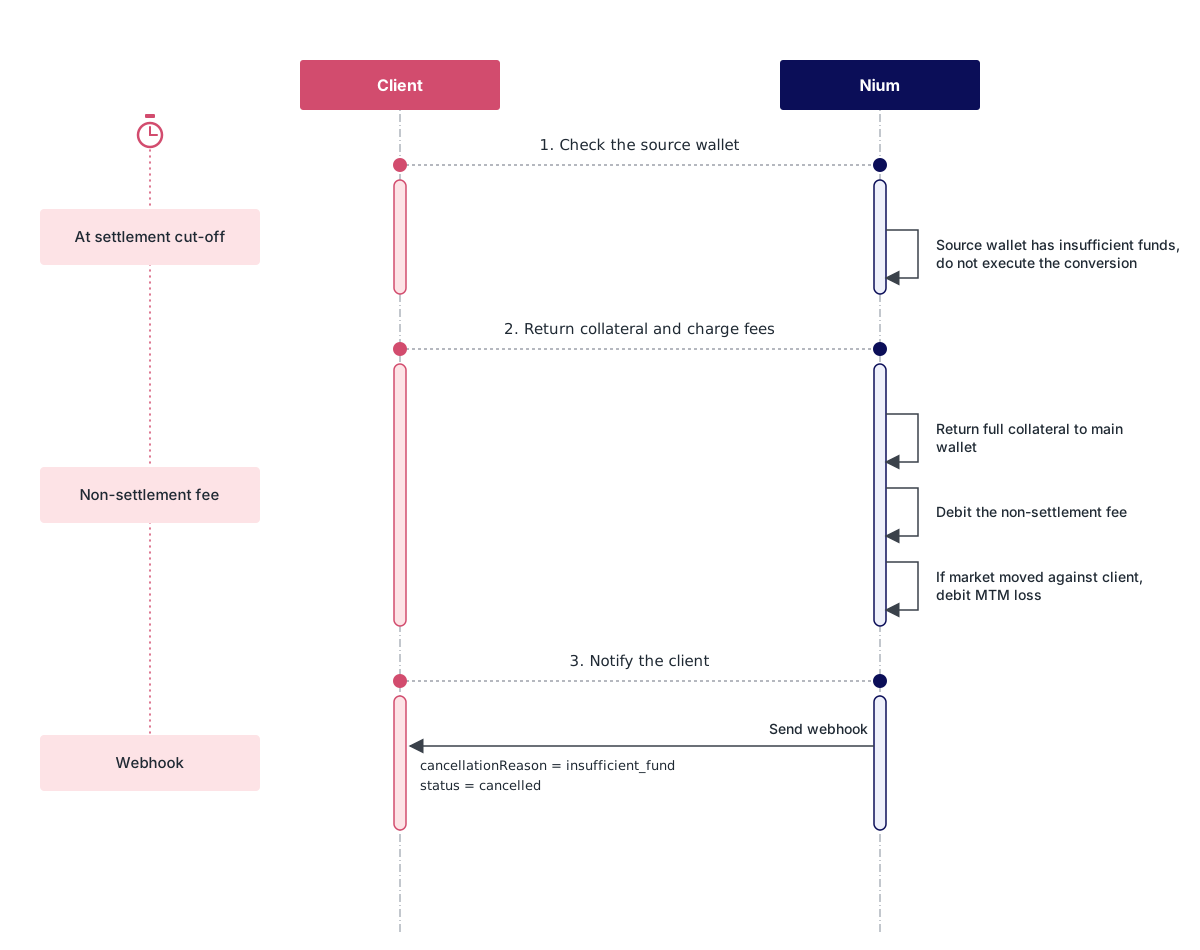
If the sell-currency wallet does not have enough funds at the settlement cut-off time, Nium does not execute the conversion. Instead:
- Nium returns the collateral from the collateral wallet to the collateral currency main wallet, after the deductions described in this step.
- Nium charges a non-settlement fee from the collateral currency main wallet. The fee is calculated on the
sourceAmount. - The conversion status changes to
cancelled.
If the market moved against you, Nium also charges the MTM loss from the collateral currency main wallet. This is a separate debit from the non-settlement fee. If the market moved in your favour, no MTM charge applies. The MTM value is calculated once Nium receives the final settlement figures, so this debit can appear after the cancellation notification.
You remain liable for applicable losses and costs, which can exceed the collateral held.
Fund the sell-currency wallet before the settlement cut-off time on the settlement date. Otherwise the forward does not settle, and the fees above apply.
Cancel a forward
You can request cancellation of a forward before its settlement date. Cancellation is not automatic. It requires consent from Nium Fintech Limited and a successful hedge unwind, as set out in the FX Forward Service Terms. Cancellation is a two-step process so you can see the cost before you confirm.
- The conversion must be in
createdstatus, which is the status of a forward until it settles. - The cancellation request must be made at least 2 calendar days before the
settlementDate. For example, for asettlementDateof 2026-11-10, cancel by 2026-11-08. - Both steps are subject to market hours: Monday to Friday, 08:00 to 23:00 Israel time. A request made outside these hours is rejected.
- The cancellation quote expires after 10 minutes.
- Cancellation takes effect only after Nium Fintech Limited consents and confirms that the hedge unwind is complete. You have no automatic right to cancel.
- Cancelling may result in costs or losses, and you remain liable for them even when they exceed the collateral held. Market gains are not credited to you, so you cannot profit by cancelling a forward.
- Include the reason for cancellation in
cancellationComment.
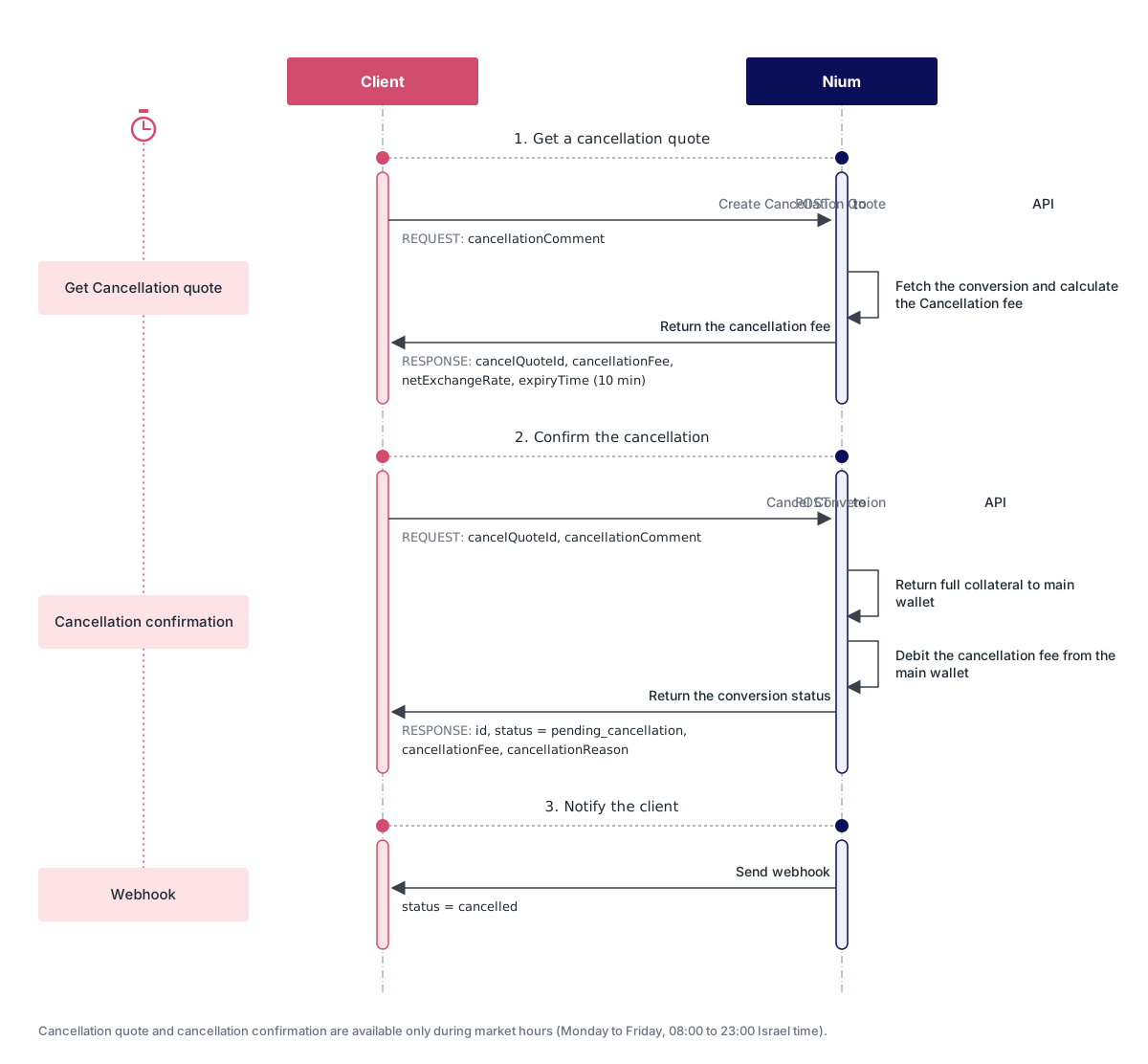
Step 1: Get a cancellation quote
Request a cancellation quote for the conversion. Nium returns the cancellation fee that would apply, and a cancelQuoteId to confirm with. The cancellation fee is an estimate of the mark-to-market (MTM) loss on the forward at the current rate. Other applicable costs may also apply. Requesting a cancellation quote does not cancel the forward.
curl -X POST "https://gateway.nium.com/api/v1/client/{clientHashId}/customer/{customerHashId}/wallet/{walletHashId}/conversions/{conversionId}/quote/cancel" \
    -H "accept: application/json" \
    -H "Content-Type: application/json" \
    -d
'{
    "cancellationComment": "Payment to supplier no longer required"
}'
{
    "cancelQuoteId": "GR-3f8a1c2e-6b1d-4e7a-9c55-0d2b8e1f4a77",
    "cancellationFee": 173.99,
    "cancellationFeeCurrencyCode": "USD",
    "netExchangeRate": 1.090000000,
    "cancellationComment": "Payment to supplier no longer required",
    "expiryTime": "2026-10-27 09:15:00"
}
Use the netExchangeRate to compare the current market rate with the rate you locked. It is quoted in the same direction as your original forward, so the two rates can be compared. The cancellation fee is the MTM fee. It applies only when the current rate is worse for you than the locked rate, and no fee applies if the rate has moved in your favour. Here the rate has moved from 1.07244 to 1.09, so the estimated MTM loss is shown as the cancellation fee, converted into the collateral currency. Other applicable costs may also be charged.
Step 2: Confirm the cancellation
Confirm within the 10-minute window by sending the cancelQuoteId from step 1. The confirmation is also subject to market hours. The conversion moves to pending_cancellation while Nium Fintech Limited consents to the cancellation and completes the hedge unwind.
curl -X POST "https://gateway.nium.com/api/v1/client/{clientHashId}/customer/{customerHashId}/wallet/{walletHashId}/conversions/{conversionId}/cancel" \
    -H "accept: application/json" \
    -H "Content-Type: application/json" \
    -d
'{
    "cancelQuoteId": "GR-3f8a1c2e-6b1d-4e7a-9c55-0d2b8e1f4a77",
    "cancellationComment": "Payment to supplier no longer required"
}'
{
    "id": "conversion_9RtKc2WmXq5HbLpD3VzYaE",
    "status": "pending_cancellation",
    "systemReferenceNumber": "WFT4402918375",
    "cancellationFee": 173.99,
    "cancellationFeeCurrencyCode": "USD",
    "netExchangeRate": 1.090000000,
    "cancellationComment": "Payment to supplier no longer required",
    "cancellationFeeSystemReferenceNumber": "3041775620F",
    "cancellationReason": "user_cancel"
}
On confirmation, Nium returns the collateral to the collateral currency main wallet, after deducting any cancellation fee (the MTM fee) and other applicable costs. Each deduction is a separate transaction. These costs can exceed the collateral held, and you remain liable for them. You then receive the webhook notification with the status cancelled.
Forward endpoints
| HTTP method | API name | Action |
|---|---|---|
| POST | Create Quote | Creates a forward quote when tradeType is FORWARDS. Returns the locked rate, settlement date, and collateral amount. |
| POST | Create Conversion | Accepts a forward quote and blocks the collateral. |
| GET | Fetch Conversion by ID | Returns the status and details of a forward conversion. |
| POST | Create Cancellation Quote | Returns a cancellation quote and fee for a forward conversion, based on the current market rate. The fee is in the collateral currency. This API does not cancel the conversion. Confirm the quote with Cancel Conversion using the cancelQuoteId before it expires. Valid only while the conversion is created, at least two calendar days before the settlement date, and during market hours (Monday to Friday, 08:00 to 23:00 Israel time). |
| POST | Cancel Conversion | Step 2 of cancellation. Confirms the cancellation using the cancelQuoteId. |