 Build faster with AI — Get started with the Nium MCP Server
Cancelled Conversion
If you need to cancel a scheduled conversion at any point before the conversion is settled, you can do it as long as your account is set up for it. This is applicable for conversions that are in the created state.
Forward conversions use a two-step cancellation flow with a confirmation window, and both steps are subject to market hours. See Forwards.
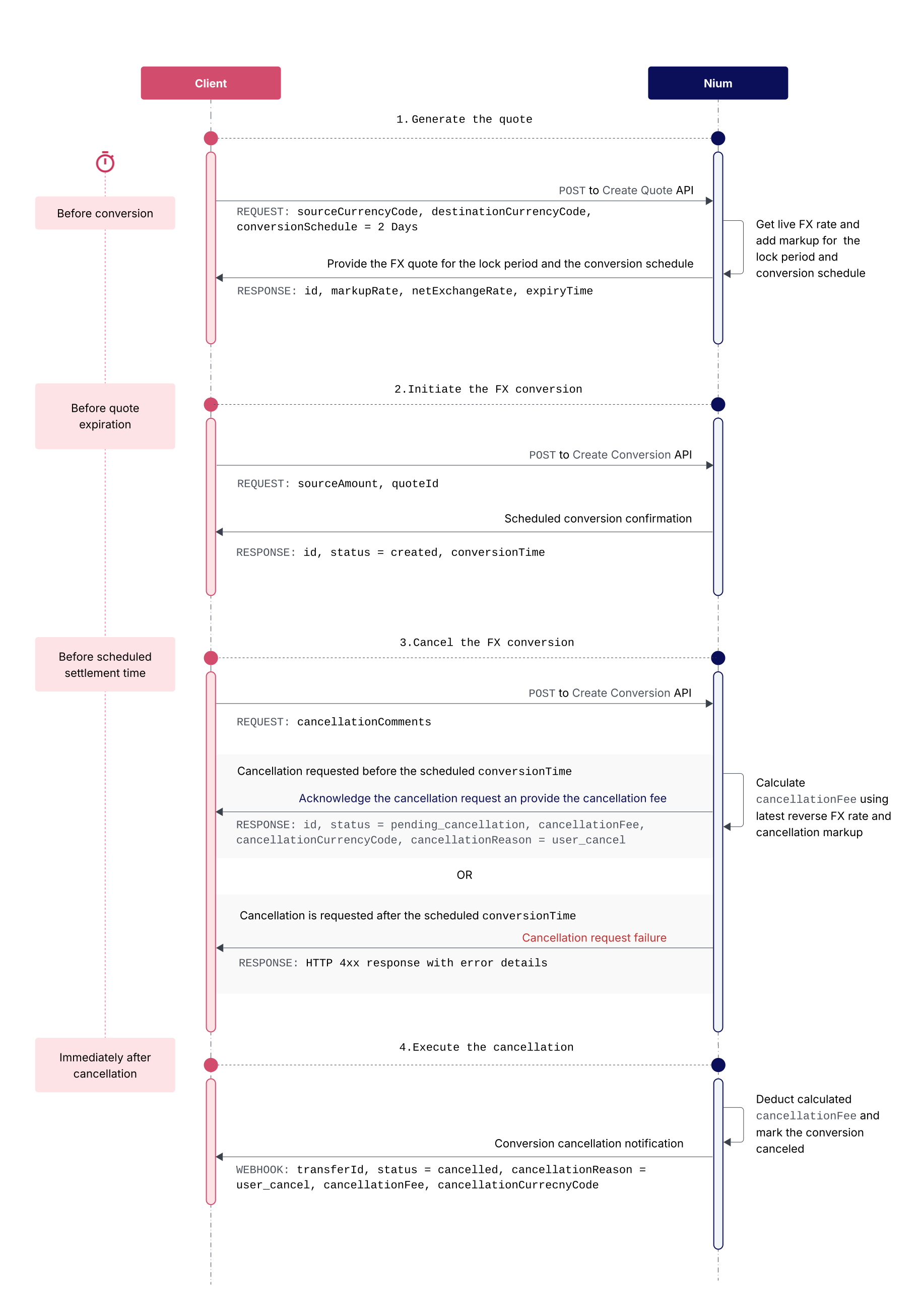
Step 1: Request a cancellation of a scheduled conversion
You can cancel a conversion scheduled for a future time if your account is set up for it. You can cancel a conversion that's in a created state as shown in the code example below.
curl -X POST "https://gateway.nium.com/api/v1/client/{clientHashId}/customer/{customerHashId}/wallet/{walletHashId}/conversions/{conversionId}/cancel" \
    -H "accept: application/json" \
    -H "Content-Type: application/json" \
    -d
'{
    "cancellationComment": "Cancelled due to payroll problem"
}'
Step 2: Get the response
Nium checks if the conversion is in the created state. If it is, Nium calculates the applicable cancellationFee by reversing the currencies and converting the original destinationAmount to a new sourceAmount at either the reverse rate as the original conversion or the market FX rate, whichever is lower. An additional cancellation markup is also deducted from this new sourceAmount, as agreed in your contract. The cancellationFee is the difference between the old sourceAmount and the new sourceAmount, and it's deducted from the wallet balance.
The conversion status is changed to pending_cancellation. The conversion resource id and the status are returned, along with the cancellation details shown in the code example below.
{
    "id": "conversion_7ANTNDEVTHwJS1eivXRdjJ",
    "status": "pending_cancellation",
    "systemReferenceNumber": "WFT7448284874",
    "cancellationFee": 5.86,
    "cancellationFeeCurrencyCode": "USD",
    "cancellationComment": "Cancelled due to payroll problem",
    "cancellationFeeSystemReferenceNumber": "3039391046F",
    "cancellationReason": "user_cancel"
}
Step 3: Get the conversion cancellation notification
Once Nium deducts the cancellationFee from the wallet balance and marks the conversion as cancelled, you see a notification that shows the status as cancelled.
{
    "clientHashId":"0498f10f-1968-494f-9f7a-454ed23942a0",
    "customerHashId":"0de1e512-e0d7-4eca-ad41-dd39325facc2",
    "walletHashId":"e83cca77-8b63-4a25-b580-1d872380ef29",
    "conversionId":"conversion_7ANTNDEVTHwJS1eivXRdjJ",
    "status":"cancelled",
    "systemReferenceNumber":"WFT7448284874",
    "cancellationFee": 5.86,
    "cancellationFeeCurrencyCode": "USD",
    "cancellationComment": "Cancelled due to payroll problem",
    "cancellationReason": "user_cancel",
    "template":"FX_CONVERSION_CANCELLED_WEBHOOK"
}
Cancel a forward
Forward conversions cancel in two steps, so you can see the fee before you confirm:
- Get a cancellation quote: call Create Cancellation Quote. Nium returns the
cancellationFeeand acancelQuoteId, which expires after 10 minutes. - Confirm the cancellation: call Cancel Conversion with the
cancelQuoteIdbefore it expires. The conversion moves topending_cancellation, and then tocancelledonce the fee is debited.
Both steps are available only during market hours (Monday to Friday, 08:00 to 23:00 Israel time). Cancellation is not automatic and is subject to the FX Forward Service Terms. For the full details, see Forwards.