 Build faster with AI — Get started with the Nium MCP Server
Global Collections
Global Collections enable Financial Institutions to collect funds on behalf of their Corporate/Individual customers across the world. These customers are the underlying beneficiaries of Financial Institutions who are owed funds for provided services or goods. Global Collections is primarily for Financial Institutions and Payment Service Providers who want to collect funds for an invoice. Financial Institutions are onboarded to Nium. These Financial Institutions are provided with a multi-currency account to collect funds on behalf of their underlying beneficiaries. Beneficiaries are in turn provided with virtual accounts.
Global Collections include:
- Multi-currency virtual accounts: Receive funds across multiple currencies and accounts (per beneficiary) for easier reconciliation.
- Integrated payout and foreign exchange (FX) margins: Settle funds in any currency while boosting FX earnings.
- API-first design: Issue accounts, reconcile payments, and move funds instantly.
- Easy customization: Brand the product as your own, maintaining full control over the customer's experience.
To use Global Collections, you'll need:
- A valid payment license.
- The ability to offer cross-border services.
High-level flow diagram
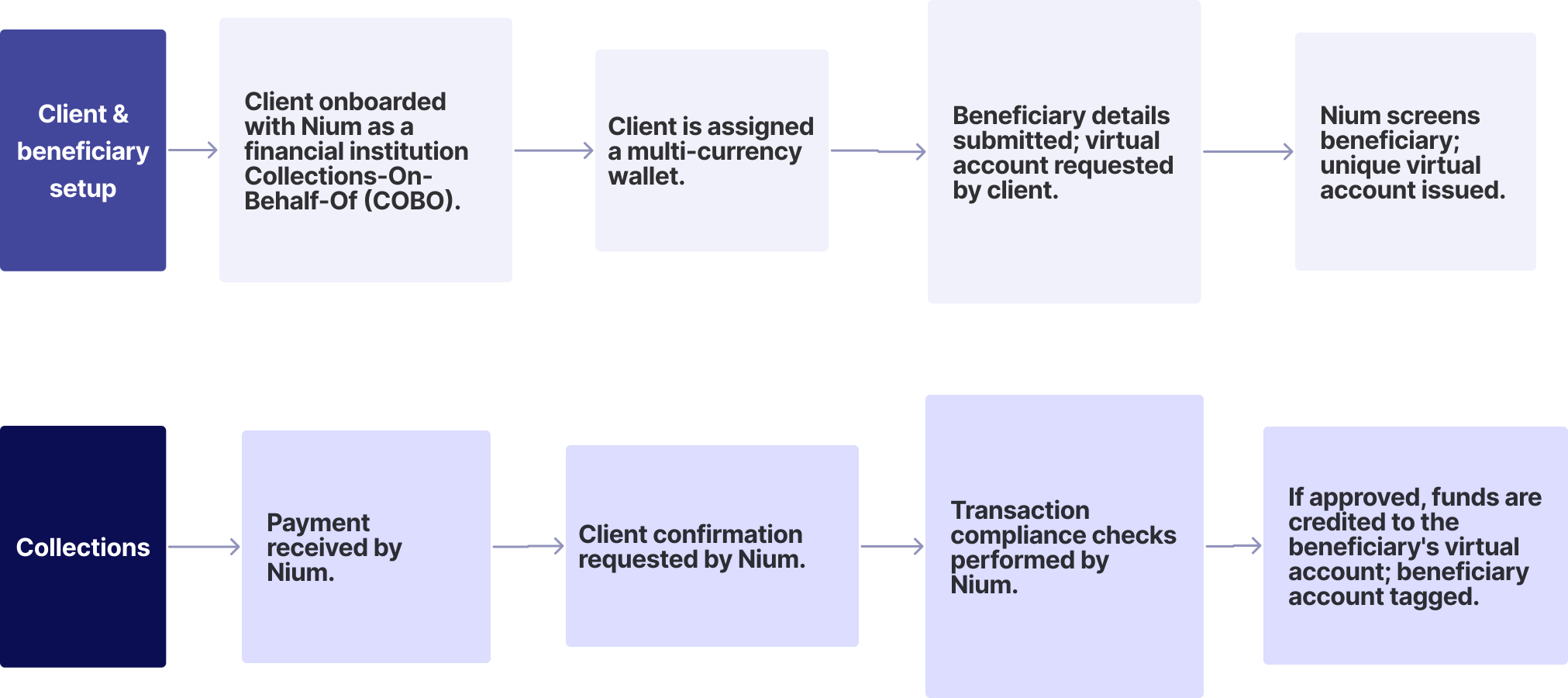
Set up
- Sign up with Nium and fetch your API credentials.
- Our compliance team processes and reviews your request. When approved, your client account is created with Nium.
- You'll be assigned a multi-currency wallet with the capability to receive funds in currencies defined during onboarding as well as store and transfer funds in or outside your Nium wallet.
- Provide information about your beneficiaries via Create Customer v5 API and you'll receive:
- A unique
customerHashId- the unique identifier for a customer of Nium. - A unique
walletHashId- the unique identifier of the multi-currency virtual wallet created for the beneficiary.
- A unique
- You can request a unique virtual account number (VAN) per currency, per beneficiary. You can also request multiple VANs per currency for a beneficiary for easier reconciliation. Information that's needed to issue a VAN includes:
customerHashIdwalletHashId
For more information, see:
Collections process
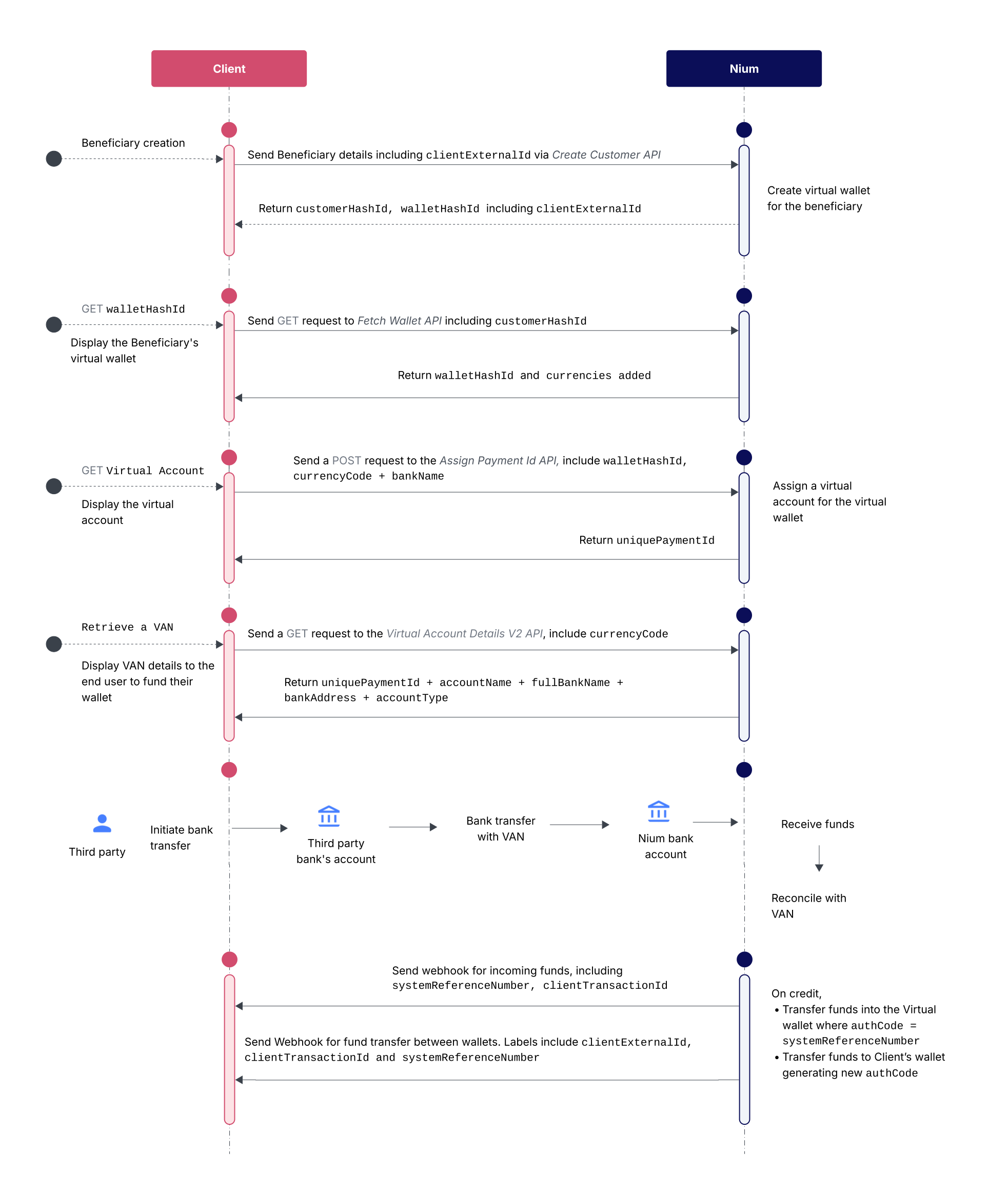
- Share the unique VAN assigned to the beneficiary with the sender.
- The sender transfers funds to the VAN.
- Nium's compliance team runs checks on the transaction; if the team raises a Request for Information (RFI), you can respond using the Respond to RFI request.
- Approved funds are:
- Credited to the beneficiary's wallet.
- Auto-debited from your multi-currency wallet.
- Tagged with transaction labels (e.g.,
Customer_Wallet_Credit_Fund_Transfer).
If rejected, funds are refunded to the source.
For more information on the requests used, see:
Settlement process
Funds in your multi-currency wallet can be settled to your local nostro account in:
- SGD (Singapore)
- USD (United States)
- GBP (United Kingdom)
- EUR (European Union)
- MXN (Mexico)
- COP (Colombia)
Available payment methods
| Currency | Sender Location | Allowed Payment Methods | Transaction Limit |
|---|---|---|---|
| EUR | Europe | SEPA Instant, SEPA Standard | SEPA Instant: 100,000 EUR; SEPA Standard: No limit |
| GBP | UK | Faster, BACS, CHAPS | Faster: 250,000 GBP; BACS: 20,000,000 GBP; CHAPS: No limit |
| SGD | Singapore | FAST, PayNow | FAST: 200,000 SGD |
| USD | USA | ACH | No limit |
| MXN* | Mexico | SPEI | No limit |
| COP* | Colombia | PSE | No limit |
- Use-case restrictions:
- COP: Collection accounts can only be used for the payment of Services and not for payment of Goods or debt collections. Nium provides local collections service in COP and not a depository account.
- MXN: Collection accounts can only be used for the payment of Goods and Services and not for payment of debt collections. Nium provides local collections service in MXN and not a depository account.
API requests
| Request | Description |
|---|---|
| Create Customer v5 | Onboard a beneficiary as a customer. |
| Customer Details | Fetch the details of a beneficiary. |
| Virtual Account Details | Fetch the VAN details of a beneficiary. |
| Respond to RFI | Submit additional information about the transaction. |
| Transactions | Fetch the transactions for a beneficiary. |
Webhooks
| Webhook | Description |
|---|---|
| Wallet Funded | Funds are credited to a beneficiary's wallet. |
| Fund Transfer Between Wallets | Funds are auto-debited. |
| Fund Received from Wallet | Transfer is received from a beneficiary's wallet. |
Common Error Scenarios
| Error Response | Description |
|---|---|
customerHashId is not valid | Incorrect beneficiary ID. |
walletHashId is not valid | Incorrect wallet ID. |
customer_not_enabled | Customer not enabled (contact Nium Support). |
missing_required_fields | Required fields are missing. |
duplicate_externalId | externalId must be unique. |
incomplete_client_setup | The client is not properly set up or KYC is incomplete. |
invalid_input | Invalid field values. |
customer_exists | Customer already exists. |