ACH Payments - USD
ACH (Automated Clearing House) is a local payment network used to send USD payments to bank accounts across the United States.
ACH provides a cost-effective alternative to wire transfers and is widely used for payroll, vendor payments, and other recurring transactions.
ACH payments are not real-time. Instead, payments are processed in scheduled clearing batches.
Two ACH payment types are relevant for payouts:
- Same-day ACH – A domestic ACH clearing system that processes payments in multiple settlement windows during the business day.
- International ACH (IAT) – Used for cross-border ACH payments initiated by clients onboarded with Nium entities outside the United States.
ACH processing windows
ACH payments are processed in clearing batches throughout the day.
All times below are Eastern Standard Time (EST).
| Window | Cutoff Time | Funds Available to Beneficiary |
|---|---|---|
| First window | 10:30 | 13:30 |
| Second window | 14:45 | 17:00 |
| Third window | 16:45 | 18:00 |
If a payout request is submitted before the daily cutoff time, funds are typically credited on the same business day.
Payment method details
The following details the values to use when creating an ACH payment:
| Attribute | Value |
|---|---|
| Payout method | LOCAL |
| Routing code type | ACH CODE |
| Destination currency | USD |
| Delivery time | Same day |
| Cutoff time | 15:15 ET |
| Availability | Business days only |
| Beneficiary bank network | All US banks with ABA routing numbers |
| Account verification | Supported |
| Narrative | remitter.name and customerComments appear on the beneficiary account statement (10 character limit each) |
| Supported countries |
|
Payout lifecycle
ACH payouts follow the standard remittance lifecycle with additional ACH-specific status updates.
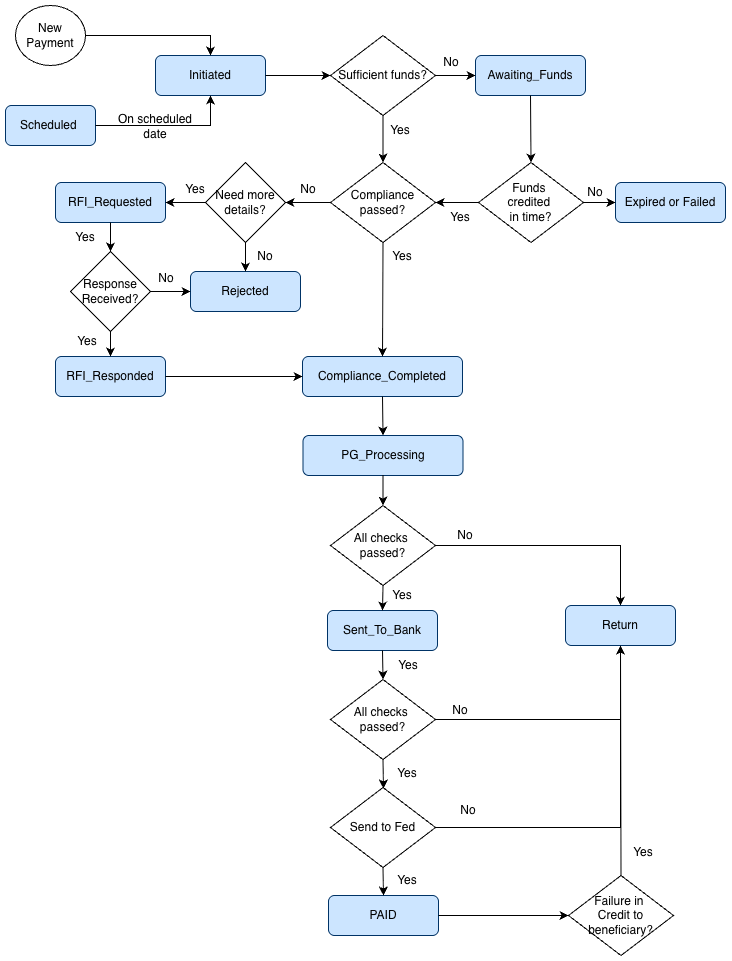
| Step | Status | Description | Step Type |
|---|---|---|---|
| 1 |
| For definitions, see Track Payouts. | Generic |
| 2 | SENT_TO_BANK | The payment has been submitted to the partner bank for ACH processing. Nium submits ACH payouts in batches to align with ACH clearing windows. | Country-specific |
| 3 | PAID | The partner bank confirms that the payment has been submitted to the Federal Reserve for settlement. Confirmation is typically received at 19:00 ET. | Country-specific |
| 4 | RETURN | The payment was unsuccessful and returned by the receiving bank (for example invalid account details or closed account). Returns typically occur within 2–4 business days, depending on the return reason code. | Country-specific |
For more information, see Payout Lifecycle.
ACH payments received before 15:15 ET are typically processed and credited to the beneficiary account on the same business day.
For ACH settlement schedules, see the following NACHA documentation: Same Day ACH Schedules and Funds Availability.
Beneficiary requirements
The following fields are required when sending USD payouts using ACH:
| Beneficiary field | Inline Beneficiary field | Description |
|---|---|---|
payoutMethod | paymentAccount.payoutMethod | Must be LOCAL. |
beneficiaryName | beneficiary.name | Must match the bank account holder name. |
beneficiaryAccountNumber | paymentAccount.accountNumber | US bank account number (typically 8–17 digits). |
beneficiaryAccountType | beneficiary.accountType | Indicates whether the beneficiary is an individual or corporate entity. |
routingCodeType1: "ACH CODE" | paymentAccount.routingCode.type | Must be ACH CODE. |
routingCodeValue1 | paymentAccount.routingCode.value | 9-digit ACH routing number (do not use wire routing numbers). |
beneficiaryBankAccountType | paymentAccount.accountType | Must be Savings or Checking. |
|
| Beneficiary address including street, city, state, and postal code. |
State is required for beneficiaries in:
- United States
- Canada
- Mexico
For more information, see Customer Onboarding
Return codes and troubleshooting
The following ISO return codes are commonly associated with ACH payouts.
| ISO Code | ISO Definition | Reason | Resolution |
|---|---|---|---|
AC03 | InvalidCreditorAccountNumber | Invalid account number or invalid combination of account number and routing code. | Verify the account number and routing code. Use Nium Verify or confirm details with the beneficiary. |
AC12 | InvalidAccountType | Invalid account type (Savings or Checking). | If not provided, Nium defaults to Checking. Ensure paymentAccount.accountType is set correctly. |
AM09 | WrongAmount | Beneficiary denied receipt of the payment or does not recognize the sender. | Confirm the beneficiary details and verify that the payment was sent to the intended account. |
AC04 | ClosedAccountNumber | The beneficiary account is closed or invalid. | Confirm updated account details with the beneficiary. |
Notifications of Change (NOC)
ACH networks may return Notifications of Change (NOC) when payment details are incorrect.
Examples include:
- incorrect routing numbers
- outdated account information
- formatting errors
When a NOC is received, Nium stores the corrected information. Subsequent payouts using the same incorrect details may be rejected with validation errors until the information is updated.