Direct Debit CA
In Canada, Direct Debit transactions are processed using a Pre-Authorized Debit (PAD) scheme. PAD is managed by Payments Canada and operates through the Automated Clearing Settlement System (ACSS).
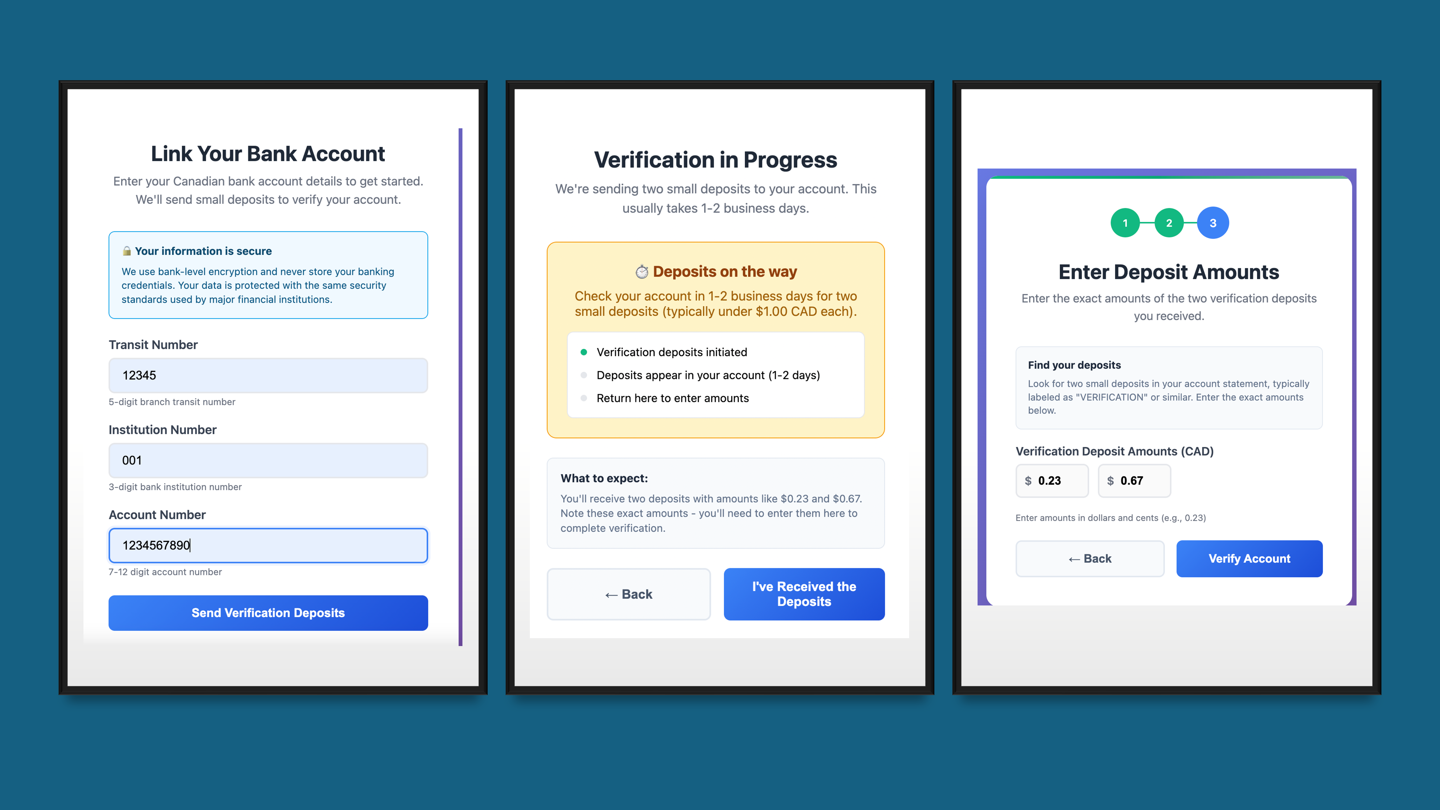
Your business customers in Canada can fund their Nium wallets using PAD. Before they can fund their wallets with Direct Debit transactions in Canadian dollars (CAD), they must first authorize a PAD agreement. This includes:
- Providing their:
- Bank account number
- Transit number
- Institution code
- Accepting the relevant Nium terms and conditions.
Requirements
To use Direct Debit in Canada, it's required that your customer is onboarded to a Nium_CA entity.
Additionally, your underlying customers must meet the following criteria:
- Customer must be corporate customers (no individual customers).
- Underlying customers must have a presence in Canada with funds available in a local bank account.
Once their bank account is linked and the PAD is authorized, your customer can fund their Nium wallet by calling the /fund endpoint and setting the funding channel to direct_debit.
Settlements
Nium’s Direct Debit service is restricted to self-funding corporate customers only. This means only an onboarded corporate customer can top up their own wallet to make payouts. This is done by calling the Fund Wallet request and specifying Direct_Debit as the funding channel.
There are two options available to settle Direct Debit funds:
- Standard settlement: Funds are initiated from the linked bank account and settled into the Nium wallet within T+4 business days. For more information, see Standard settlements.
- Faster settlements: Available on a risk-approved basis, where funds can be settled within the same day. For more information, see Faster settlements.
For more information, see Settlement timelines.
Transaction limits
Direct Debit transactions in Canada are subject to a $99 million CAD limit, which is the maximum allowed for this payment rail.
However, Nium may apply additional limits based on your business and associated customers. By default, Nium recommends a standard limit of $250,000 CAD.
- The dollar limit for the overall rail is $99 million CAD, though limits may vary by client and customer profile.
- Nium recommends standard limits of $250,000 CAD, though higher limits can be approved through the Nium Support team or your Nium Account Manager, based on projected volume.
If your projected volumes require higher limits, contact your Nium account manager or Nium Support team to request an increase.
Account verification
For authorizing and linking bank accounts to initiate Direct Debits, the following methods are available:
To initiate Direct Debit in Canada, your customers must first link and authorize their bank account. Nium supports multiple methods for account verification:
Microdeposit verification
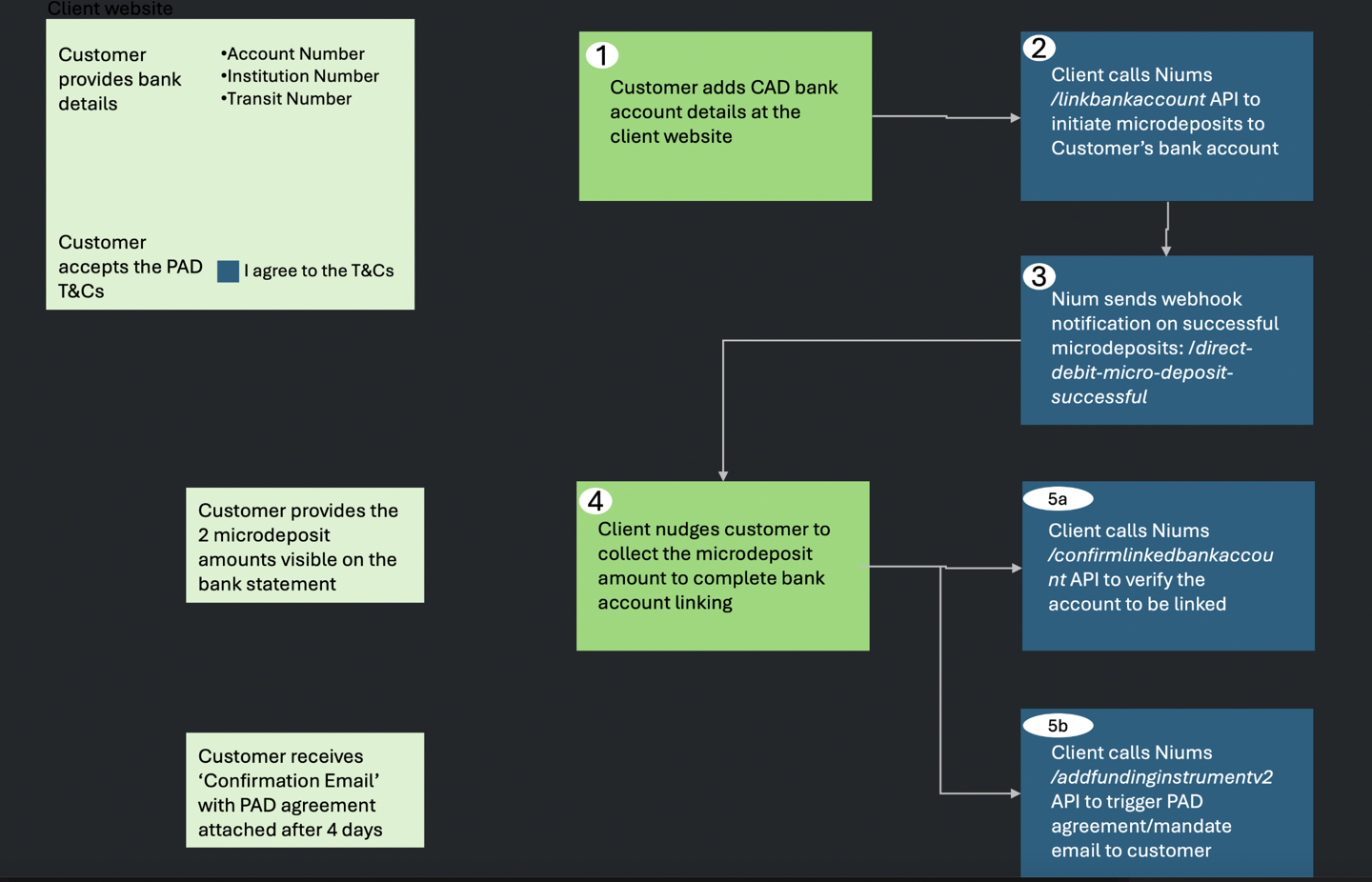
With Nium’s white-label microdeposit verification method, you can build your own UI to securely link your customer's bank account.
- The customer enters their bank account details in your UI.
- Nium sends two small deposits to the customer’s bank account.
- The customer logs into their online banking and notes the deposit amounts.
- They enter those amounts in your UI to verify their account.
- Once verified, Nium sends a webhook notification confirming the account was successfully linked.
Plaid verification
Plaid provides an open banking solution for account authorization and linking.
- The customer invokes the Plaid widget to initiate account verification.
- The customer selects their bank and logs in for instant authorization.
- If their bank is unavailable in Plaid’s repository, the customer can opt for the Plaid Microdeposits flow:
- The customer shares their bank account details and receives a CAD 0.01 deposit with a unique code.
- The customer provides this code via the Plaid widget to complete the linkage.
Settlement timelines
For CAD Direct Debits, settlement follows one of two timing options depending on your setup and risk approval.
Standard settlements
- Timeline: T+4 business days
- Cutoff time: 6:30 PM ET
- Explanation: T+4 means funds will be available four business days after the transaction is initiated.
For example, if the transaction starts on a Monday, funds typically settle by Friday (excluding holidays).

Once the Direct Debit transactions is initiated, funds are credited to your customer’s wallet within this standard settlement window.
Faster settlements
Faster, same-day settlements are available for eligible customers but requires prior approval from Nium based on the customer's risk profile.
- To enable faster settlements, contact your Nium Account Manager or Nium Support to review setup requirements and obtain approval.

Requests
To get started, depending on the verification method you choose, use the following requests to verify a customer's account:
- Microdeposits
- Plaid (Instant or Microdeposits)
Microdeposits
Use the following requests to link a Canadian bank account, verify it with microdeposits, and fund a wallet using Direct Debit.
| HTTP Method | API Name | Description |
|---|---|---|
POST | Add Bank Account | Submit your customer's bank account details (account number, transit code, and institution number). This starts the microdeposit process—small, random amounts are sent to their bank account for verification. |
POST | Confirm Bank Account | After the microdeposits are received, your customer enters the deposit amounts through this API. If correct, the account is verified. Save the bankAccountId returned in the response. |
POST | Set Up Funding Instrument | Use the bankAccountId to create a funding instrument. You’ll get back a fundingInstrumentId, which you’ll use for future Direct Debit transactions. |
GET | Fetch Linked Bank Accounts | (Optional) Retrieve the list of funding instruments linked to your customer. You can also get details for a specific fundingInstrumentId - the fundingInstrumentId is returned in the response of the Add Funding Instrument request. |
POST | Fund Wallet | Start a Direct Debit transaction by selecting the "direct_debit" funding channel and providing the fundingInstrumentId. The funds will be pulled from the linked bank account and deposited into your customer’s wallet. On their bank statement, the payment appears as Nium. |
Plaid
Customers are redirected to a Plaid-hosted page where they can verify their bank account (via Instant or Microdeposit verification).
The return_URL is provided in the response of:
- For instant verifications, see Add funding instrument.
- For microdeposit verification, see Confirm Funding Instrument.
After completion, the customer is redirected back to your app or platform based on how the return_URL is configured.
| HTTP Method | API Name | Action |
|---|---|---|
| POST | Add Funding Instrument | Provide the bank account’s country (CA) and currency (CAD). Ensure return_URL is configured. |
| POST | Confirm Funding Instrument (Microdeposit only) | Enter the 3-digit code from the customer’s bank account statement. |
| GET | Get Funding Instrument Details | Retrieve details for a specific funding instrument ID. |
| GET | Get Funding Instrument List | Retrieve the list of registered funding instruments. |
| POST | Fund Wallet | Fund the customer’s wallet by selecting direct_debit and providing the fundingInstrumentId. |
Redirect URL
After authenticating with Plaid, customers are redirected to your website or app. To keep them updated on their verification status, include the following during Direct Debit setup:
- URL to redirect customers to after completing the form
- Application URL
- Customer host
- Port number
Redirect URL format
The following details the format of the URL that'll be generated to redirect customers after they verify their account.
URL: GET
https://<customerHost:Port>?fundingInstrumentId={fundingInstrumentId}&status={status}
It includes the fundingInstrumentId, which represents the customer’s linked bank account in Nium, and the verification status.
Testing Direct Debit
Before going live, test your Direct Debit integration in your sandbox environment.
Testing Microdeposits
Use the steps below to test microdeposits in your sandbox environment.
- Add Bank Account: Submit valid bank account details to start the microdeposit process.
- Simulate Microdeposits endpoint: Trigger the deposit of two small, random amounts into the bank account. These simulate real microdeposits from Nium.
- Confirm Bank Account: Enter the microdeposit amounts to verify the account. You’ll receive a
bankAccountIdin the response. - Set Up Funding Instrument: Use the
bankAccountIdto create a funding instrument. You’ll receive afundingInstrumentId. - Fund Wallet: Use the
fundingInstrumentIdto initiate a Direct Debit transaction. Capture thesystemReferenceNumberfrom the response. - Simulate Inward Payment endpoint: Use the
systemReferenceNumberto simulate the incoming Direct Debit and complete reconciliation.
Mandates
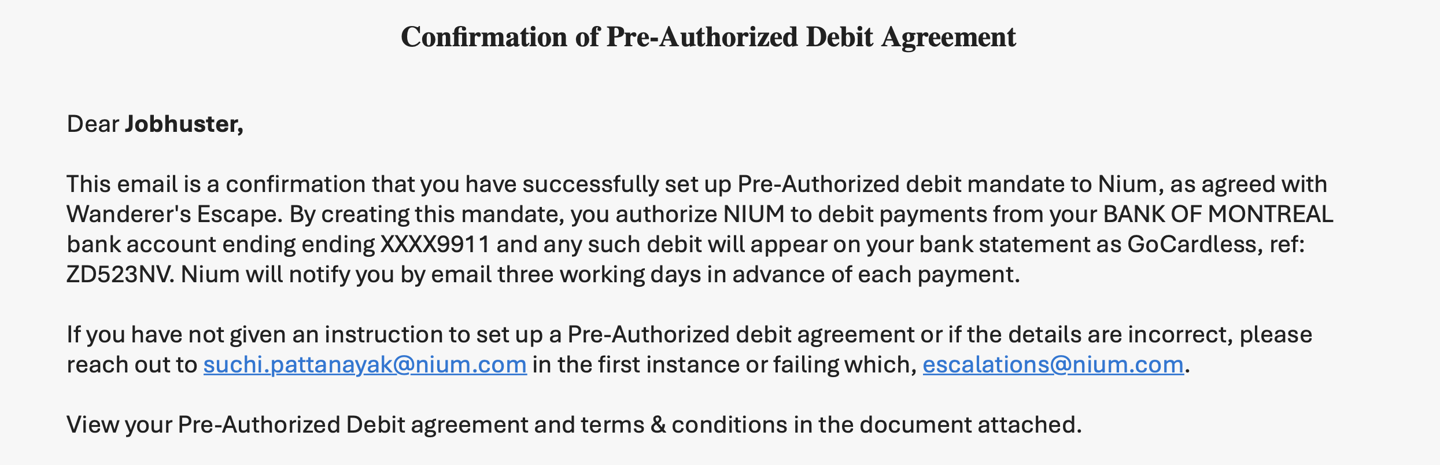
As part of the account verification process, your customer will receive a Pre-Authorized Debit (PAD) email.
This is a regulatory requirement in Canada. The email serves as formal authorization for Nium to debit funds from the linked bank account.
Below is a sample of the PAD authorization email your customer will receive:
Chargebacks
Corporate customers have up to 9 business days to dispute a Direct Debit transaction.
If a chargeback request is submitted within this window, Nium will honor the request and return the funds to the customer.