Beneficiaries
A beneficiary is the individual or business authorized to receive funds from a specific source, such as a bank account or financial transfer.
In the context of Nium, a beneficiary represents the recipient of a payment or transfer. These details are essential
to securely and accurately process transactions.
Beneficiary resource
The beneficiary resource represents the entity receiving receiving funds in a payout. It includes essential details
about the recipient, such as the entity's name, address, and email.
A beneficiary can either be a:
- Individual
- Business
Additionally, a beneficiary can be associated with one or more payment accounts. The following breaks down the fields
and details for individual and business beneficiaries.
Note: Required fields are marked with an asterisk (*).
Individual beneficiaries
| Field | Description |
|---|---|
beneficiaryName* | Full name of the beneficiary. |
beneficiaryAccountType* | Account type: Individual or Corporate. |
beneficiaryCountryCode* | ISO-2 country code of the beneficiary. |
destinationCurrency* | 3-letter ISO-4217 destination currency code. |
payoutMethod* | Payout method: LOCAL, SWIFT, WALLET, CARD, or PROXY. |
beneficiaryEmail | Email address of the beneficiary. |
beneficiaryContactCountryCode | Mobile number country code (without +). |
beneficiaryContactNumber | Mobile number digits only, without country code. |
beneficiaryDob | Date of birth (format: YYYY-MM-DD). Applicable only to individual beneficiaries. |
remitterBeneficiaryRelationship | The relationship between the sender and the receiving entity in the context of the transaction. |
Business beneficiaries
| Field | Description |
|---|---|
beneficiaryName* | Full name of the beneficiary. |
beneficiaryAccountType* | Account type: Individual or Corporate. |
beneficiaryCountryCode* | ISO-2 country code of the beneficiary. |
destinationCurrency* | 3-letter ISO-4217 destination currency code. |
payoutMethod* | Payout method: LOCAL, SWIFT, WALLET, CARD, or PROXY. |
beneficiaryEmail | Email address of the beneficiary. |
beneficiaryContactName | Contact person name (for corporate beneficiaries). |
beneficiaryContactCountryCode | Mobile number country code (without +). |
beneficiaryContactNumber | Mobile number digits only, without country code. |
beneficiaryEntityType | Entity type of the business (e.g. partnership). |
beneficiaryEstablishmentDate | Date of establishment (format: YYYY-MM-DD). |
remitterBeneficiaryRelationship | The relationship between the sender and the receiving entity in the context of the transaction. |
When you create a new beneficiary, a unique ID (beneficiaryHashId) is generated and assigned to the new
beneficiary. Use this beneficiaryHashId and the beneficiary endpoint (or
Nium Portal) to manage the beneficiary’s details and associated payment accounts.
Payment account
A payment-account represents the account details of a beneficiary. Specifically, a payment-account includes the
banking details needed for beneficiaries to receive funds from payouts.
This includes details like the country, currency, payment method (LOCAL, SWIFT, PROXY, WALLET, and * CARD*), routing code, account number, etc.
The details needed to create a payment-account vary by payout corridor. The payout corridor is determined by:
- Country (
payoutCountry) - Currency (
payoutCurrency) - Payment method (
payoutMethod)
The table below lists the most common required fields for setting up a beneficiary’s payment-account. For specific
corridor or payment method requirements, see
the Add Payment Account
request.
Note: Required fields are marked with an asterisk (*).
| Field | Description |
|---|---|
beneficiaryAlias | A short alias for the beneficiary (5–30 characters). |
beneficiaryAccountNumber | Bank account number of the beneficiary. |
beneficiaryBankName | Bank name of the beneficiary. |
beneficiaryBankCode | Bank identifier code. |
beneficiaryBankAccountType | Bank account type: Current, Saving, Maestra, or Checking. |
beneficiaryAddress | Street address of the beneficiary. |
beneficiaryCity | City of the beneficiary. |
beneficiaryState | State of the beneficiary. |
beneficiaryPostcode | Postal code of the beneficiary. |
destinationCountry | 2-letter ISO-2 country code of the destination. |
routingCodeType1 | Routing code type 1. E.g. SWIFT, IFSC, SORT CODE, ACH CODE, BSB CODE, BANK CODE, BRANCH CODE. |
routingCodeValue1 | Routing code value 1. |
routingCodeType2 | Routing code type 2. |
routingCodeValue2 | Routing code value 2. |
proxyType | Required when payoutMethod is PROXY. Values per network: SGD-PayNow: MOBILE, UEN, NRIC, VPA; INR-UPI: VPA; BRL-PIX: MOBILE, ID, EMAIL, RANDOM_KEY; AUD-PayID: MOBILE, EMAIL, ABN, ORGANISATION_ID; MYR-DuitNow: NRIC, PASSPORT, CORPORATE_REGISTRATION_NUMBER, MOBILE, ARMY_ID. |
proxyValue | Required when payoutMethod is PROXY. Mobile number must include country code. |
encryptedBeneficiaryCardToken | System-generated card token. Mandatory for non-PCI DSS compliant clients when payout method is CARD. |
beneficiaryCardExpiryDate | Card expiry date. Required for CARD payout method. |
When you create a new payment-account, a unique ID (paymentAccountHashId) will be assigned to the newly created
payment-account. Use the paymentAccountHashId to manage account details or issue a payout using
the Transfer Money request.
Managing beneficiaries
Clients can manage beneficiaries using:
Nium API
Use the beneficiary endpoint to manage beneficiaries and payment-accounts.
Beneficiary requests
| Request | Description |
|---|---|
| Add Beneficiary (V2) | Adds a new beneficiary and saves their information for future transactions. |
| Delete Beneficiary (V2) | Deletes a beneficiary and removes their information from the system. |
| Get Beneficiaries (V2) | Returns a list of beneficiaries linked to your account or organization. |
| Get Beneficiary Details (V2) | Fetches detailed information about a specific beneficiary using their unique ID. |
| Get Beneficiary Token (V2) | Retrieves an authentication token to securely interact with the beneficiary resource. |
| Update Beneficiary Details (V2) | Modifies an existing beneficiary’s details, such as contact information or payment accounts. |
Payment Account requests
| Request | Description |
|---|---|
| **Add Payment Account ** | Adds a new payment-account under an existing beneficiary. |
| Get Bank Details | Fetches details about the bank based on the submitted routing code. |
| **Get Payment Account Details ** | Retrieves detailed information about a specific payment-account using its unique identifier. |
| **Get Payments Accounts ** | Retrieves a list of all payment-accounts associated with a specific beneficiary. |
| **Remove Payment Account ** | Deletes a payment-account from a beneficiary's list of accounts. |
| **Update Payment Account Details ** | Updates the details of an existing payment-account, such as routing codes or account holder information. |
Creating payment accounts
In addition to creating payment-accounts, use
the Add Payment Account
request to check the required details for a specific payout corridor.
Based on the payoutCountry, payoutCurrency, and payoutMethod used, the response to the request will detail the
fields that are required to create a corridor specific payment-account for your beneficiary.
The data submitted in the request is validated against field-specific requirements, such as character limits, string length, and special characters.
This response helps simplify the process of creating beneficiaries and payment-accounts by eliminating the need to
submit additional requests,
like Fetch Supported Corridors
or Beneficiary Validation Schema.
Nium Portal
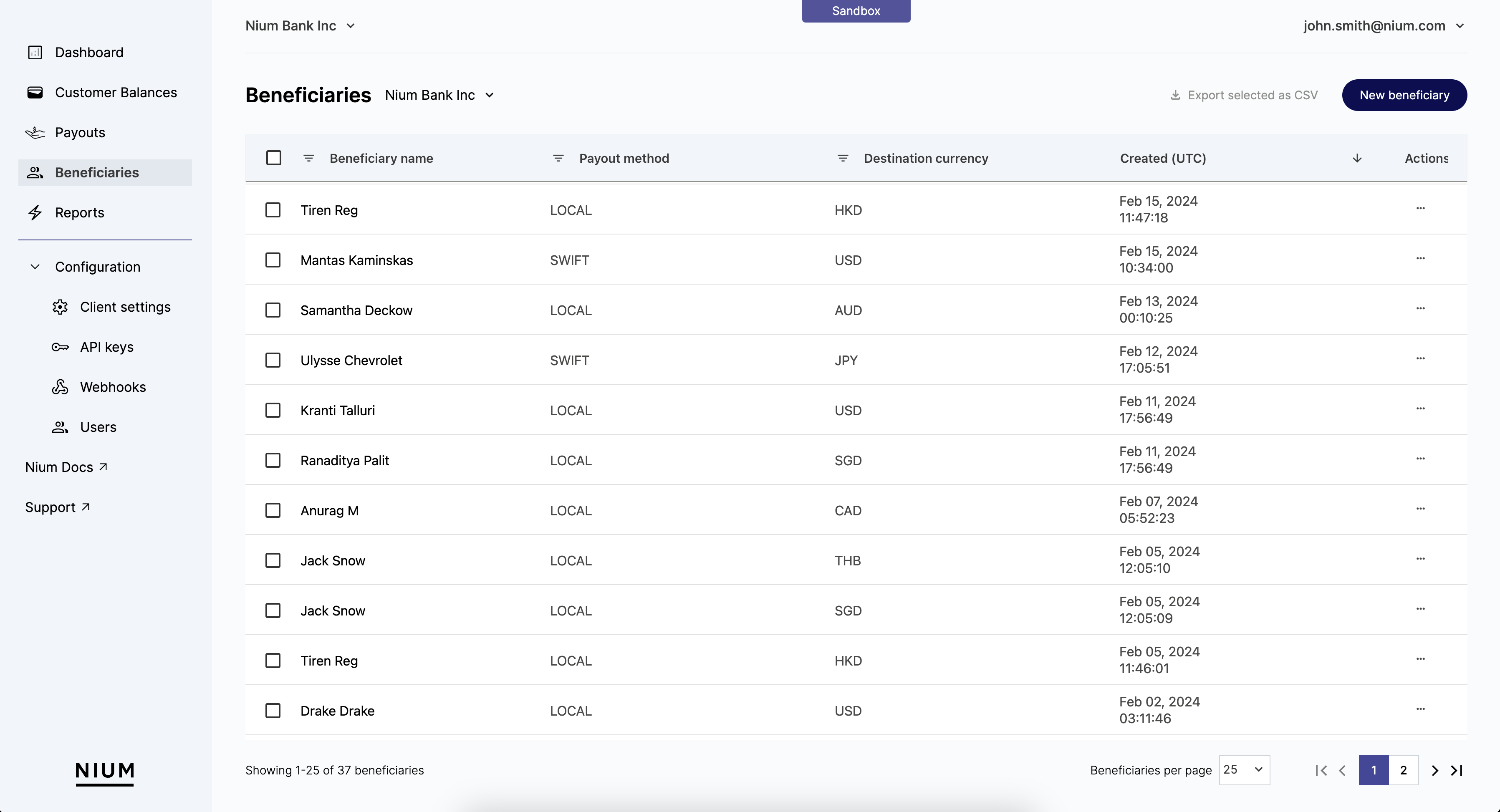
Use the Beneficiaries page in Nium Portal to manage the different beneficiaries that have been created for a customer.
For additional details, see Nium Portal - Overview.
Creating a beneficiary
The following examples break down the steps to create a beneficiary and a payment-account.
Step 1: Add a beneficiary
Use
the Add Beneficiary (V2)
request to add a beneficiary for a customer. The required details depend on the beneficiary type (entityType).
After creating a beneficiary, a unique beneficiaryHashId is assigned. Use this ID to manage the beneficiary and
its associated payment-accounts.
When making the request, include:
clientHashId– Your unique identifier, generated during onboarding.customerHashId– The unique identifier for the customer, generated when the customer is created.
Individual beneficiary
curl --location 'https://gateway.nium.com/api/v2/clients/42a8224a-09b6-422d-b557-c560354ccb4a/customers/44ca05f5-5fe4-47c1-bc78-af4bb4440bae/beneficiaries' \
--header 'Content-Type: application/json' \
--header 'x-api-key: <client-api-key>' \
--data-raw '{
"beneficiaryName": "John Singh",
"beneficiaryAccountType": "Individual",
"beneficiaryCountryCode": "MY",
"destinationCurrency": "PHP",
"destinationCountry": "PH",
"payoutMethod": "LOCAL",
"beneficiaryAccountNumber": "NDIyOTk4MDA2OTk0ODY1MQ==",
"beneficiaryAlias": "JohnSingh01",
"beneficiaryBankName": "BDO Unibank",
"beneficiaryEmail": "john@example.com",
"beneficiaryAddress": "123 Tower Bridge",
"beneficiaryCity": "Manila",
"beneficiaryContactCountryCode": "60",
"beneficiaryContactNumber": "9902892467",
"routingCodeType1": "BANK CODE",
"routingCodeValue1": "010269"
}'
Business beneficiary
curl --location 'https://gateway.nium.com/api/v2/clients/42a8224a-09b6-422d-b557-c560354ccb4a/customers/44ca05f5-5fe4-47c1-bc78-af4bb4440bae/beneficiaries' \
--header 'Content-Type: application/json' \
--header 'x-api-key: <client-api-key>' \
--data-raw '{
"beneficiaryName": "Nium",
"beneficiaryAccountType": "Corporate",
"beneficiaryCountryCode": "MY",
"destinationCurrency": "PHP",
"destinationCountry": "PH",
"payoutMethod": "LOCAL",
"beneficiaryAccountNumber": "NDIyOTk4MDA2OTk0ODY1MQ==",
"beneficiaryAlias": "Nium01",
"beneficiaryBankName": "BDO Unibank",
"beneficiaryEmail": "test@nium.com",
"beneficiaryContactName": "Test",
"beneficiaryContactCountryCode": "60",
"beneficiaryContactNumber": "9902892467",
"beneficiaryEntityType": "partnership",
"beneficiaryEstablishmentDate": "2000-01-01",
"remitterBeneficiaryRelationship": "partner",
"routingCodeType1": "BANK CODE",
"routingCodeValue1": "010269"
}'
Step 2: Add a payment account
Use
the Add Payment Account
request to add a payment-account for a beneficiary. Before adding a payment-account, you must first create a
beneficiary.
The required details vary based on:
- Payout corridor – Determined by
payout-countryandpayout-currency. - Payment method – Defined by the
payout-methodused.
Be sure to include the following in your request:
beneficiaryHashIdclientHashIdcustomerHashId
When you add a new payment-account, Nium checks for duplicates to prevent multiple entries of the same account.
The following payment-account properties are used to determine duplicates:
| Payment Method | Properties |
|---|---|
| LOCAL or SWIFT |
|
| PROXY |
|
| WALLET |
|
| CARD |
|
Note: To add another payment-account for the same beneficiary, send the relevant request(s) multiple times.
Sample requests
The following example requests show how to create different types of payment-accounts.
US Local Payment Account
payout-country: USpayout-currency: USDpayment-method: LOCAL
curl --location 'https://gateway.nium.com/api/v2/clients/42a8224a-09b6-422d-b557-c560354ccb4a/customers/44ca05f5-5fe4-47c1-bc78-af4bb4440bae/beneficiaries' \
--header 'Content-Type: application/json' \
--header 'x-api-key: <client-api-key>' \
--data '{
"beneficiaryName": "John Singh",
"beneficiaryAccountType": "Individual",
"beneficiaryCountryCode": "US",
"destinationCurrency": "USD",
"destinationCountry": "US",
"payoutMethod": "LOCAL",
"beneficiaryAccountNumber": "0112345678",
"beneficiaryAlias": "test payment account",
"beneficiaryAddress": "123 Elm St",
"beneficiaryCity": "Anytown",
"beneficiaryState": "Anystate",
"beneficiaryPostcode": "94536",
"routingCodeType1": "ACH CODE",
"routingCodeValue1": "114916488"
}'
HK-GBP SWIFT Payment Account
payout-country: HKpayout-currency: GBPpayment-method: SWIFT
curl --location 'https://gateway.nium.com/api/v2/clients/42a8224a-09b6-422d-b557-c560354ccb4a/customers/44ca05f5-5fe4-47c1-bc78-af4bb4440bae/beneficiaries' \
--header 'Content-Type: application/json' \
--header 'x-api-key: <client-api-key>' \
--data '{
"beneficiaryName": "John Singh",
"beneficiaryAccountType": "Individual",
"beneficiaryCountryCode": "HK",
"destinationCurrency": "GBP",
"destinationCountry": "HK",
"payoutMethod": "SWIFT",
"beneficiaryAccountNumber": "0112345678",
"beneficiaryAlias": "test payment account",
"beneficiaryBankCode": "402",
"beneficiaryBankAccountType": "Checking",
"beneficiaryAddress": "123 Elm St",
"beneficiaryCity": "Anytown",
"beneficiaryState": "Anystate",
"beneficiaryPostcode": "94536",
"routingCodeType1": "SWIFT",
"routingCodeValue1": "ABCHHKHH"
}'
SG Proxy Payment Account
payout-country: SGpayout-currency: SGDpayment-method: PROXY
curl --location 'https://gateway.nium.com/api/v2/clients/42a8224a-09b6-422d-b557-c560354ccb4a/customers/44ca05f5-5fe4-47c1-bc78-af4bb4440bae/beneficiaries' \
--header 'Content-Type: application/json' \
--header 'x-api-key: <client-api-key>' \
--data '{
"beneficiaryName": "John Singh",
"beneficiaryAccountType": "Individual",
"beneficiaryCountryCode": "SG",
"destinationCurrency": "SGD",
"destinationCountry": "SG",
"payoutMethod": "PROXY",
"beneficiaryAlias": "test payment account",
"beneficiaryAddress": "123 Elm St",
"beneficiaryCity": "Anytown",
"beneficiaryState": "Anystate",
"beneficiaryPostcode": "94536",
"proxyType": "MOBILE",
"proxyValue": "1234567891"
}'
CN Wallet Payment Account
payout-country: CNpayout-currency: CNYpayment-method: WALLET
curl --location 'https://gateway.nium.com/api/v2/clients/42a8224a-09b6-422d-b557-c560354ccb4a/customers/44ca05f5-5fe4-47c1-bc78-af4bb4440bae/beneficiaries' \
--header 'Content-Type: application/json' \
--header 'x-api-key: <client-api-key>' \
--data '{
"beneficiaryName": "John Singh",
"beneficiaryAccountType": "Individual",
"beneficiaryCountryCode": "CN",
"destinationCurrency": "CNY",
"destinationCountry": "CN",
"payoutMethod": "WALLET",
"beneficiaryAlias": "test payment account",
"beneficiaryAddress": "123 Elm St",
"beneficiaryCity": "Anytown",
"beneficiaryState": "Anystate",
"beneficiaryPostcode": "94536"
}'
CN Card Payment Account
payout-country: CNpayout-currency: CNYpayment-method: CARD
curl --location 'https://gateway.nium.com/api/v2/clients/42a8224a-09b6-422d-b557-c560354ccb4a/customers/44ca05f5-5fe4-47c1-bc78-af4bb4440bae/beneficiaries' \
--header 'Content-Type: application/json' \
--header 'x-api-key: <client-api-key>' \
--data '{
"beneficiaryName": "John Singh",
"beneficiaryAccountType": "Individual",
"beneficiaryCountryCode": "CN",
"destinationCurrency": "CNY",
"destinationCountry": "CN",
"payoutMethod": "CARD",
"beneficiaryAlias": "test payment account",
"beneficiaryAddress": "123 Elm St",
"beneficiaryCity": "Anytown",
"beneficiaryState": "Anystate",
"beneficiaryPostcode": "94536",
"beneficiaryCardIssuerName": "nium",
"beneficiaryCardExpiryDate": "2028-10"
}'
CN Card-Token Payment Account
payout-country: CNpayout-currency: CNYpayment-method: CARD with a card-token.
curl --location 'https://gateway.nium.com/api/v2/clients/42a8224a-09b6-422d-b557-c560354ccb4a/customers/44ca05f5-5fe4-47c1-bc78-af4bb4440bae/beneficiaries' \
--header 'Content-Type: application/json' \
--header 'x-api-key: <client-api-key>' \
--data '{
"beneficiaryName": "John Singh",
"beneficiaryAccountType": "Individual",
"beneficiaryCountryCode": "CN",
"destinationCurrency": "CNY",
"destinationCountry": "CN",
"payoutMethod": "CARD",
"beneficiaryAlias": "test payment account",
"beneficiaryAddress": "123 Elm St",
"beneficiaryCity": "Anytown",
"beneficiaryState": "Anystate",
"beneficiaryPostcode": "94536",
"beneficiaryCardIssuerName": "nium",
"encryptedBeneficiaryCardToken": "<token-generated-using-card-widget-API>",
"beneficiaryCardExpiryDate": "2028-10"
}'
Sample response
The following is a sample response for creating a payment-account with:
payout-country: USpayout-currency: USDpayment-method: LOCAL
Sensitive information is masked in the response.
{
"beneficiaryHashId": "91df5b80-2b48-47a0-b395-a941fca1e0da",
"payoutHashId": "16984a1f-df52-4808-948a-49b84967349e",
"beneficiaryName": "John Singh",
"beneficiaryAccountType": "Individual",
"beneficiaryCountryCode": "US",
"beneficiaryAddress": "*****",
"beneficiaryCity": "Anytown",
"beneficiaryState": "*****",
"beneficiaryPostcode": "*****",
"beneficiaryEmail": "j*****@example.com",
"beneficiaryBankName": "Citizens State Bank of Luling",
"beneficiaryBankAccountType": "Checking",
"beneficiaryAccountNumber": "******5678",
"routingCodeType1": "ACH CODE",
"routingCodeValue1": "114916488",
"destinationCountry": "US",
"destinationCurrency": "USD",
"payoutMethod": "LOCAL",
"beneficiaryCreatedAt": "2024-12-11",
"beneficiaryUpdatedAt": "2024-12-11"
}
Updating a beneficiary
The Update Beneficiary (V2) request enables you to update and modify the details of a beneficiary.
All properties of a beneficiary can be changed except:
beneficiaryAccountTypebeneficiaryEmailbeneficiaryEntityType
When updating a beneficiary, you must include:
clientHashIdcustomerHashIdbeneficiaryHashId
Updating a payment account
The Update Payment Account
request works similarly to
the Update Beneficiary (V2)
request. It updates a beneficiary’s payment-account with the details provided in the request body.
All properties of a payment-account can be modified except:
beneficiaryAccountTypebeneficiaryEmailbeneficiaryEntityType
When updating a payment-account, you must include:
beneficiaryHashIdclientHashIdcustomerHashIdpaymentAccountHashId
When you update a payment-account, the system checks for duplicates to prevent multiple entries of the same account.
If the updated details match another payment-account assigned to the same beneficiary, the request is rejected.
The following payment-account properties are used to determine duplicates:
| Payment Method | Properties |
|---|---|
| LOCAL or SWIFT |
|
| PROXY |
|
| WALLET |
|
| CARD |
|
Deleting a beneficiary
Use
the Delete Beneficiary (V2)
request to delete a beneficiary.
For auditing reasons, the request will soft-delete the beneficiary. Deleting a beneficiary will also soft-delete all
of the associated payment-accounts.
- Deleted
beneficiarieswon’t be listed in the GET or LISTbeneficiaryrequests. - To delete a
beneficiary, you must include the:clientHashIdcustomerHashIdbeneficiaryHashId
Deleting a payment account
Use
the Remove Payment Account
to remove a payment-account from a beneficiary.
For auditing reasons, the request will soft delete the payment-account.
- Deleted
payment-accountswon’t be listed in the GET or LISTbeneficiaryrequests. - To delete a
beneficiaryyou must include the:clientHashIdcustomerHashIdbeneficiaryHashIdpaymentAccountHashId
Blocking a beneficiary or payment account
Use
the Update Beneficiary (V2)
and Update Payment Account
requests to block a beneficiary or payment-account.
By default, beneficiaries and payment-accounts have a status of active. Use
the Update Beneficiary (V2)
and Update Payment Account
requests to update the status of beneficiaries and payment-accounts.
Blocking a beneficiary or payment-account temporarily stops payments in case of an issue.
- To block a
beneficiary, use the Update Beneficiary (V2) request and set thebeneficiary.statusto blocked.- Note: Blocking a
beneficiaryalso blocks all associatedpayment-accounts.
- Note: Blocking a
- To block a
payment-account, use the Update Payment Account request and set thepayment-account.statusto inactive.
Fetch beneficiary or payment account
The Fetch Beneficiary Details (V2)
and Fetch Payment Account Details
requests allow you to retrieve details of a beneficiary or its associated payment-account.
By default, sensitive information is masked in the response. To retrieve unmasked data, set the unmaskData query
parameter to true.
Below is an example of a Fetch Payment Account Details (V2) response with masked data.
{
"id": "16984a1f-df52-4808-948a-49b84967349e",
"beneficiaryHashId": "91df5b80-2b48-47a0-b395-a941fca1e0da",
"owner": {
"name": "Nium",
"address": {
"line1": "*****",
"line2": "*****",
"city": "Anytown",
"state": "*****",
"countryCode": "us",
"postalCode": "*****"
},
"identification": {
"type": "type",
"value": "*alue"
}
},
"autoSweep": {
"default": false,
"enable": false
},
"alias": "test payment account",
"payoutCountry": "US",
"payoutCurrency": "USD",
"paymentMethod": "LOCAL",
"verificationStatus": {
"status": "unverified"
},
"status": "active",
"bankName": "Citizens State Bank of Luling",
"accountType": "checking",
"accountNumber": "******5678",
"routingCodes": [
{
"type": "ach_code",
"value": "114916488"
}
],
"openDate": "2024-12-11",
"default": false
}
List beneficiaries or payment accounts
The List Beneficiaries (V2)
and List Payment Accounts (V2)
requests retrieve a list of beneficiaries for a customer and payment-accounts for a beneficiary.
- By default, sensitive information is masked in the response. To retrieve unmasked data, set the
unmaskDataquery parameter to true. - Items are sorted by
creation-timeandpaymentAccountId. - The response is paginated and uses cursor-based pagination.
Below is a sample response for a List Beneficiaries (V2) request.
[
{
"beneficiaryHashId": "1e3882af-c622-456e-8fbd-c951f3368577",
"payoutHashId": "a1b2c3d4-e5f6-7890-abcd-ef1234567890",
"beneficiaryName": "Jeff Grell",
"beneficiaryAccountType": "Individual",
"beneficiaryCountryCode": "US",
"beneficiaryEmail": "j*****@frontside.net",
"destinationCountry": "US",
"destinationCurrency": "USD",
"payoutMethod": "LOCAL",
"beneficiaryAccountNumber": "******5678",
"routingCodeType1": "ACH CODE",
"routingCodeValue1": "114916488"
},
{
"beneficiaryHashId": "82bce9d9-f69a-45c7-ab6c-12167a64ed2f",
"payoutHashId": "b2c3d4e5-f6a7-8901-bcde-f12345678901",
"beneficiaryName": "Nium",
"beneficiaryAccountType": "Individual",
"beneficiaryCountryCode": "SG",
"beneficiaryEmail": "t*****@nium.com",
"beneficiaryContactCountryCode": "65",
"beneficiaryContactNumber": "*******7890",
"destinationCountry": "SG",
"destinationCurrency": "SGD",
"payoutMethod": "LOCAL",
"beneficiaryAccountNumber": "******1234",
"remitterBeneficiaryRelationship": "relationship",
"beneficiaryDob": "2000-01-01"
},
.............
.............,
{
"beneficiaryHashId": "6fc33e40-f65b-4574-9b4d-3f2ba5491a6d",
"payoutHashId": "c3d4e5f6-a7b8-9012-cdef-123456789012",
"beneficiaryName": "Nium",
"beneficiaryAccountType": "Individual",
"beneficiaryCountryCode": "MY",
"beneficiaryEmail": "t*****@nium.com",
"beneficiaryContactCountryCode": "60",
"beneficiaryContactNumber": "*******7890",
"destinationCountry": "MY",
"destinationCurrency": "MYR",
"payoutMethod": "LOCAL",
"remitterBeneficiaryRelationship": "relationship",
"beneficiaryDob": "2000-01-01"
}
]
SCA Authentication for EU/UK clients
To comply with PSD2 regulations, EU/UK clients must include an authenticationCode in POST and PUT requests.
The authenticationCode is a one-time password (OTP) or verification code used as a second authentication factor before
calling Nium APIs.
Transfer money
With the changes
in Add Beneficiary (V2)
and Payment Account ,
the Transfer Money request also accepts the paymentAccountHashId.
Below are examples of how to transfer money and create a payout using the paymentAccountHashId.
Step 1: Add a payment account
After creating a beneficiary, add a payment-account for them.
curl --location 'https://gateway.nium.com/api/v3/clients/42a8224a-09b6-422d-b557-c560354ccb4a/customers/44ca05f5-5fe4-47c1-bc78-af4bb4440bae/beneficiaries/09671eda-68fc-4d05-ba89-8a95174fbdac/payment-accounts' \
--header 'Content-Type: application/json' \
--header 'x-api-key: <client-api-key>' \
--data '{
"authenticationCode": "12345",
"payoutCountry": "US",
"payoutCurrency": "USD",
"paymentMethod": "LOCAL",
"alias": "test payment account",
"accountType": "checking",
"accountNumber": "0112345678",
"owner": {
"address": {
"line1": "123 Elm St",
"line2": "Suite 5",
"city": "Anytown",
"state": "Anystate",
"countryCode": "us",
"postalCode": "94536"
},
"identification": {
"type": "type",
"value": "value"
}
},
"routingCodes": [
{
"type": "ach_code",
"value": "114916488"
}
]
}'
Step 2: Transfer funds
Create a remittance to transfer funds using the paymentAccountHashId.
curl --location 'https://preprod.spend.nium.com/wallet-service/api/v1/client/20bd3def-49cb-45d6-ab2a-963640322b76/customer/d1218522-4f71-479b-a644-653275e389bf/wallet/aaaedd53-3e8d-4f98-a98e-47cb4f68a7ed/remittance' \
--header 'Content-Type: application/json' \
--header 'csrf_token: ....' \
--header 'Authorization: Bearer .....' \
--data '
{
"purposeCode": "IR006",
"customerComments": "Family Maintenance",
"authenticationCode": "test",
"beneficiary": {
"paymentAccountId": "e6ee9f20-98c1-4779-814e-014636edd5d8"
},
"payout": {
"source_amount": 1,
"source_currency": "SGD"
}
}'